

Plan Your Personal Income Tax with the HumanSoft App
The HumanSoft app makes personal income tax planning easier by allowing employees to review income, expenses, and deduction information while calculating estimated tax. This helps employees prepare and plan their taxes appropriately throughout the year.
Table of Contents:
- Plan Your Personal Income Tax with the HumanSoft App
- Personal Income Tax Planning
- Estimating Personal Income Tax Deductions
- How to Estimate Tax Deductions with the HumanSoft App
- How Does the HumanSoft App Help with Tax Planning?
- Traditional Tax Planning vs. the HumanSoft App
- Conclusion: Plan Your Personal Income Tax with the HumanSoft App
- FAQ: Frequently Asked Questions About the HumanSoft App and Tax
Personal Income Tax Planning
Once we enter the workforce, taxes inevitably become part of our lives because our financial activities throughout the year affect the amount of tax we pay. With a clear understanding of tax filing, we may be able to save more by claiming all eligible tax deductions correctly.
Put simply, tax deductions help reduce the amount of tax we pay. They are legally permitted amounts that can be deducted from income after expenses to ease the taxpayer’s burden. The benefits include lower tax payments and potentially larger tax refunds. All of this starts with effective personal income tax planning. Today, tax planning can be done easily through HR software or an application using features that estimate tax deductions as follows:
Estimating Personal Income Tax Deductions
Before estimating tax deductions, you need to plan your personal income tax by knowing your total income, total deductions, and total tax liability. You can then estimate your tax deductions by following these simple steps:
How to Estimate Tax Deductions with the HumanSoft App
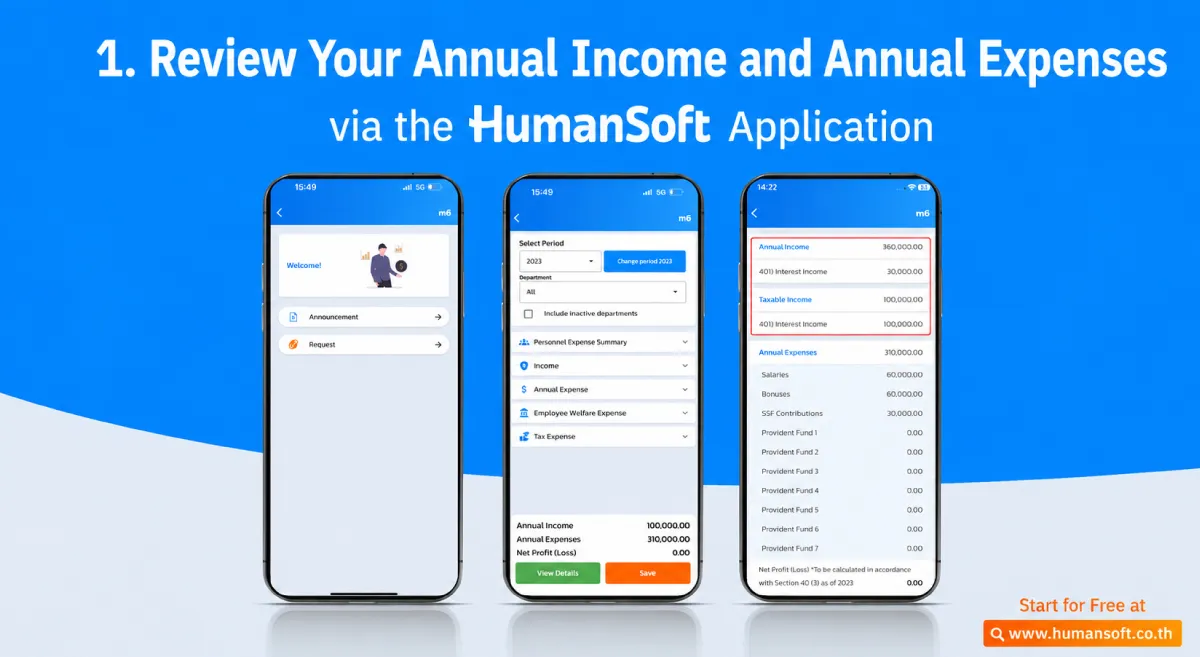
1. Review Annual Income and Expenses
This first step is essential because annual income and expenses must be collected to determine whether tax is due and how much must be paid. The HumanSoft app automatically calculates total income and expenses under the “Assessable Income” and “Expense Deductions” sections.
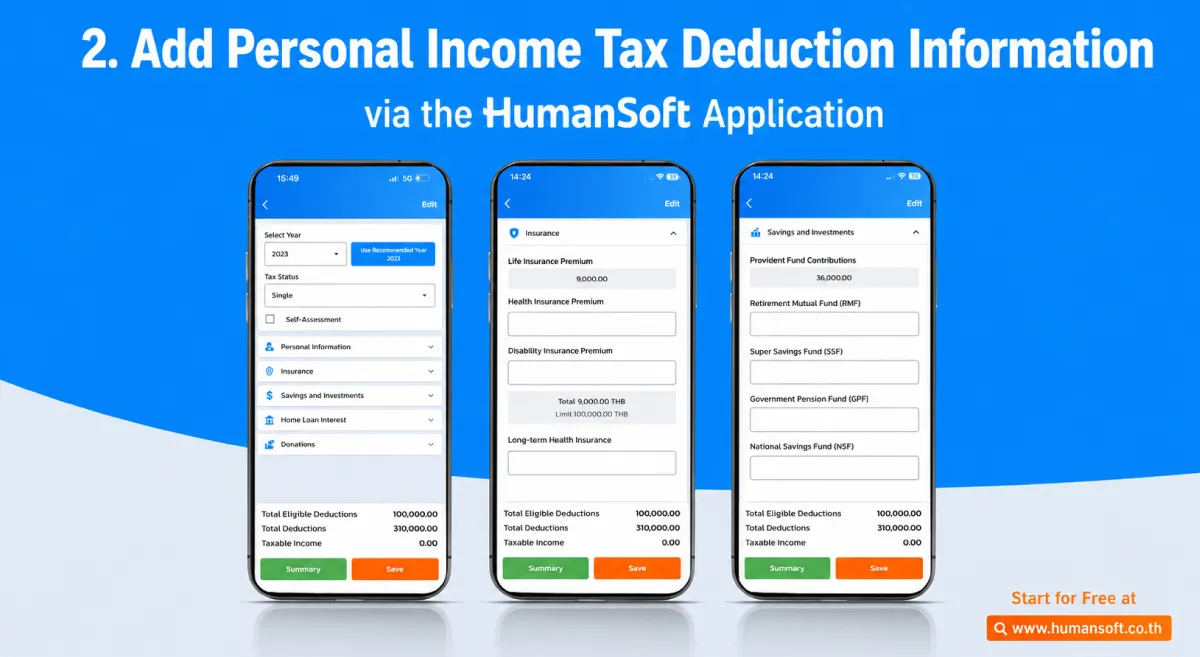
2. Add Personal Income Tax Deduction Information
Tax deductions are legal entitlements granted according to an individual’s status, circumstances, and financial responsibilities. Examples include personal allowances, disability allowances, support for parents and children, home loan interest, savings, investments, and life insurance premiums. These deductions can reduce the amount of tax owed. Users can add information under the relevant categories, while the standard personal allowance is entered automatically by the system.
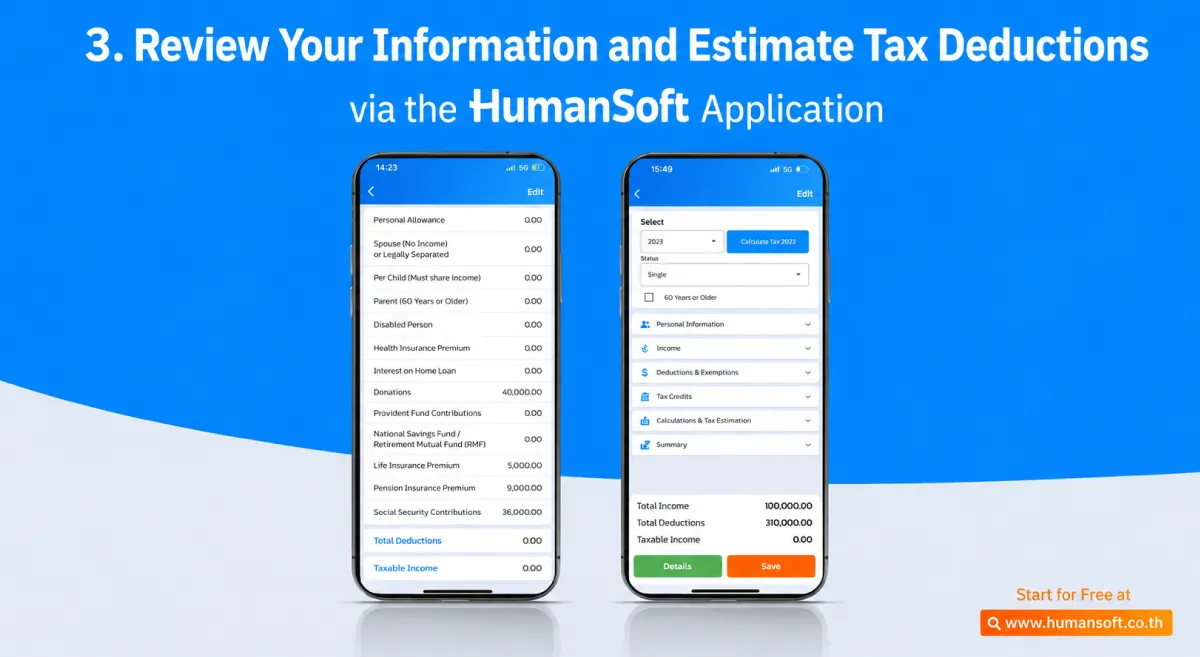
3. Review Information and Estimate Tax Deductions
Once all income, expenses, and deductions are known, estimating tax deductions becomes straightforward. The HumanSoft app automatically calculates net income and estimated tax payable, which can be viewed in the “Details” menu. If the estimated tax is high, users can review other eligible deduction categories they have not yet claimed to help reduce the amount payable.
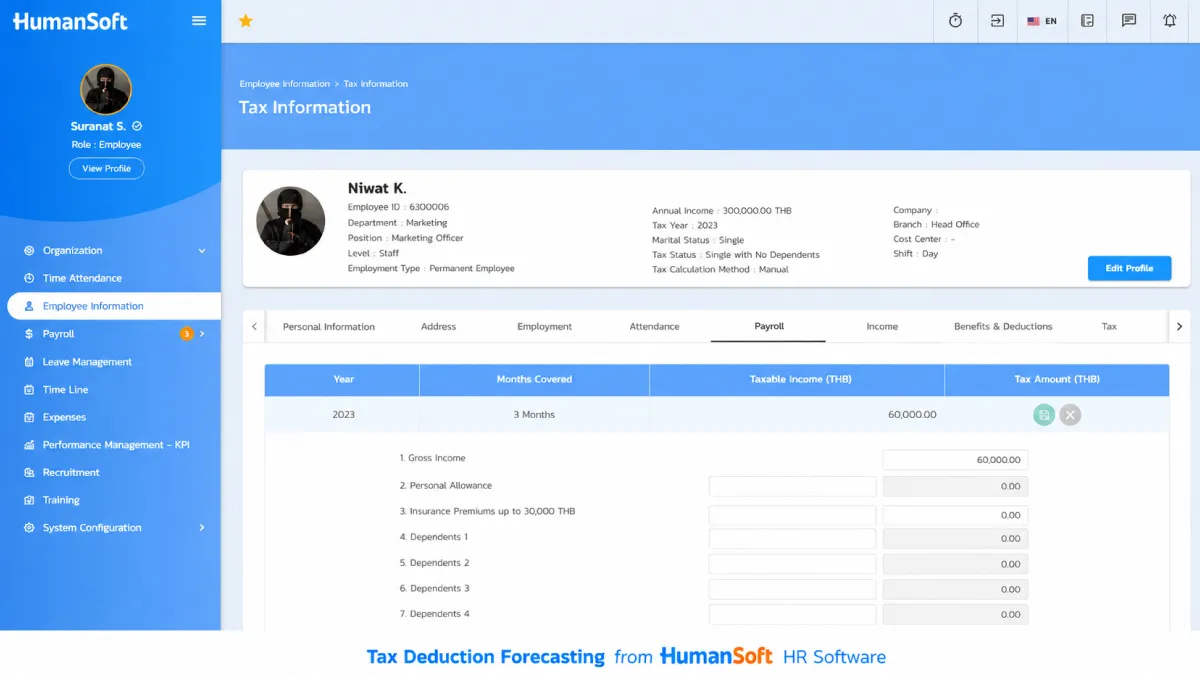
With this information, personal income tax and deduction entitlements can be planned more easily, accurately, and comprehensively. The tax deduction estimation feature is also available through a web browser.
How Does the HumanSoft App Help with Tax Planning?
- Review Income and Expenses The system consolidates relevant income information, such as Salary Expense deductions to provide the initial information needed for tax calculations.
- Add Tax Deduction Information Employees can review and add deduction information, such as Personal allowance Spouse allowance Child allowance Parent allowanceLife insurance Investments Home loan interestaccording to each individual’s eligibility.
- Calculate and Review Estimated Tax Once income and deduction information is complete, the system can calculate net income and estimated tax. Employees can review the details for further planning, such as Whether to claim additional deductions Estimated tax payable Reviewing information before filing
Traditional Tax Planning vs. the HumanSoft App
| Comparison Point | Traditional Method | App HumanSoft |
| Income Review | Collect information manually | Use data from the system |
| Tax Calculation | Calculate manually | The system assists with calculations |
| Deduction Information | Remember and collect information manually | Add information to the system |
| Advance Tax Review | Completed at year-end | Plan throughout the year |
| Errors | Risk of incorrect data entry | Reduce manual steps |
| Data Access | Must ask HR | Review through the system |
*Information as of August 2026
Conclusion: Plan Your Personal Income Tax with the HumanSoft App
Planning tax deductions in advance helps employees claim their entitlements correctly, reduce errors, and manage taxes more efficiently. The HumanSoft app calculates and estimates tax, making it easier to review information, plan deductions, and prepare for tax obligations in one system.
FAQ: Frequently Asked Questions About the HumanSoft App and Tax
Q : How Does HumanSoft Help HR Manage Tax?
A : It manages salary, earnings, deductions, and Payroll-related information, making it easier for HR to review and manage tax data.
Q : Can Employees Add Tax Deduction Information Through the App?
A : Yes. Employees can add deduction information under supported categories such as family, insurance, savings, investments, and home loan interest. They should verify the applicable conditions and retain supporting documents.
Q : Must Additional Income Be Entered?
A : Income from side jobs, other employers, rent, investments, or other sources must be included according to the relevant income category because it may not appear in the current employer’s Payroll system.
Read More Related Articles
