

How Are Thailand Social Security Sections 33, 39, and 40 Different?
Social Security Section 33 is mandatory for employees, with contributions of 5% of wages, up to THB 875 per month, and coverage for seven benefit categories. Section 39 is for former employees who want to maintain coverage, at THB 432 per month for six categories. Section 40 is for self-employed workers, with contribution options of THB 70, 100, or 300 per month and coverage for three to five categories.
Table of Contents:
- How Are Thailand Social Security Sections 33, 39, and 40 Different?
- Understanding Social Security in Thailand
- What Are the Differences Between Social Security Sections 33, 39, and 40?
- Mandatory Social Security Coverage (Section 33)
- Voluntary Social Security Coverage (Section 39)
- Voluntary Social Security Coverage (Section 40)
- How Can You Check Your Social Security Section Using ThaiD?
- Summary: How Do Social Security Sections 33, 39, and 40 Differ?
- FAQ: Social Security Sections 33, 39, and 40
Understanding Social Security in Thailand
Although many Thai people contribute to the Social Security Office every month, some may not know which section they are insured under or fully understand the benefits available through their contributions.
This lack of awareness can cause people to miss out on benefits designed to provide support when needed, including during illness, unemployment , or retirement
What Are the Differences Between Social Security Sections 33, 39, and 40?
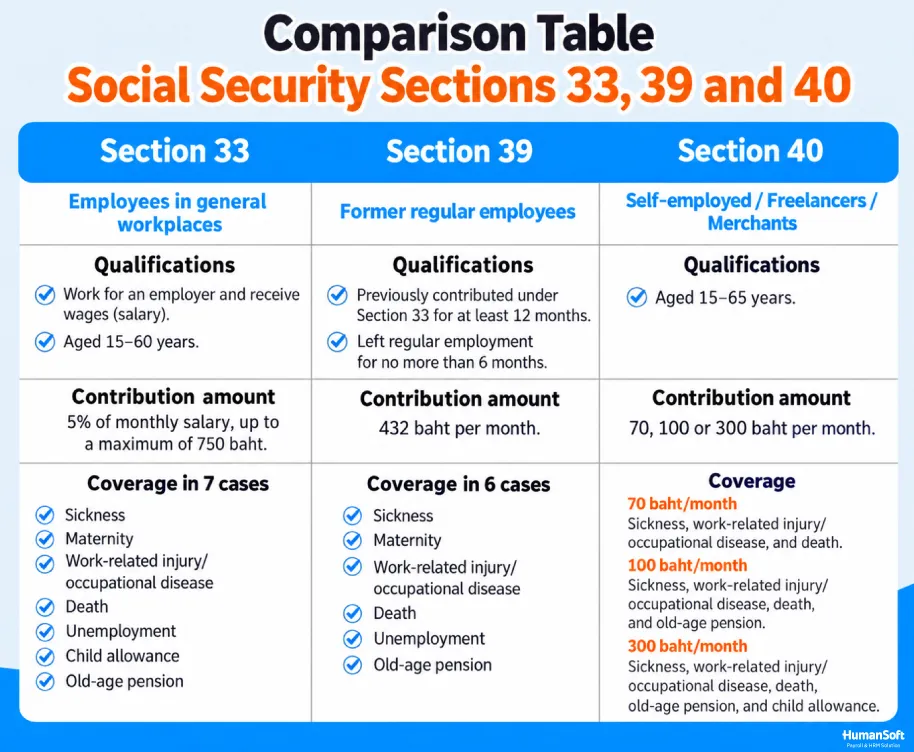
The three sections differ in eligibility, whether participation is compulsory or voluntary, contribution rates, and the number of covered benefit categories. Here is a comparison:
| Category | Section 33 | Section 39 | Section 40 |
|---|---|---|---|
| Who is covered? | Employees of private-sector businesses | Former Section 33 employees who have left their jobs and wish to continue coverage | Self-employed and informal-sector workers |
| Participation | Mandatory | Voluntary | Voluntary |
| Age | 15–60 years | No age limit (continuation from Section 33) | 15–65 years |
| Insured person’s contribution | 5% of wages, based on THB 1,650–17,500 (THB 83–875/month) | THB 432/month | THB 70 / 100 / 300 per month |
| Other contributors | Employer: 5% + government: 2.75% | Government: THB 120/month | Government: THB 30 / 50 / 150 per month |
| Benefits covered | 7 categories | 6 categories (excluding unemployment) | 3–5 categories, depending on the plan |
*The maximum wage base for Section 33 contributions has been THB 17,500 since January 1, 2026 (information as of October 2026).
Mandatory Social Security Coverage (Section 33)
Section 33 provides mandatory coverage under Thailand’s Social Security Act for employees of legally registered private-sector businesses with at least one employee. Employers are responsible for registering employees aged 15 to 60 and making contributions at the following rates: employee 5%, employer 5%, and government 2.75%.
Section 33 insured persons are entitled to benefits in seven main categories:
- Medical benefits for illness
- Disability compensation
- Benefits in the event of death
- Maternity benefits
- Child allowance
- Old-age lump-sum benefit or pension
- Unemployment benefits
Voluntary Social Security Coverage (Section 39)
Section 39 applies to people who were previously insured as employees under Section 33, have left their jobs, and wish to maintain social security coverage by enrolling voluntarily under Section 39.
Applicants must have contributed under Section 33 for at least 12 months and apply within six months of leaving employment. They must also not be receiving disability compensation from the Social Security Fund.
Section 39 members pay a fixed contribution of THB 432 per month, while the government contributes another THB 120 per month. Coverage includes six main benefit categories:
- Medical benefits for illness or accidents
- Disability compensation
- Death benefits
- Maternity benefits
- Child allowance
- Old-age lump-sum benefit or pension
Note: Section 39 does not include unemployment benefits. However, people who have recently left employment may still be eligible for unemployment benefits based on their previous Section 33 coverage.
Voluntary Social Security Coverage (Section 40)
Section 40 offers voluntary social security to people outside formal employment, including vendors, informal workers, and freelancers who do not have an employer and are not covered under Section 33 or 39.
To enroll under Section 40, applicants must be between 15 and 65 years old and must not be civil servants or employees of state enterprises, as those groups receive other forms of government welfare. Section 40 offers different benefit packages depending on the monthly contribution selected:
1. THB 70 per month: Coverage for three categories
- Illness or accidents: Up to THB 300 per day (no more than 30 days per year)
- Disability: THB 500–1,000 per month for up to 15 years
- Death: Funeral benefit of THB 25,000, plus another THB 8,000 after 60 months of contributions
2. THB 100 per month: Coverage for four categories
- Illness or accidents: Up to THB 300 per day (no more than 30 days per year)
- Disability: THB 500–1,000 per month for up to 15 years
- Old age: THB 50 per month toward an old-age lump-sum benefit (optional additional savings of up to THB 1,000/month)
- Death: Funeral benefit of THB 25,000, plus another THB 8,000 after 60 months of contributions
3. THB 300 per month: Coverage for five categories
- Illness or accidents Up to THB 300 per day (no more than 90 days per year)
- Disability THB 500–1,000 per month for life
- Child allowance THB 200 per child per month, for up to two children
- Old age THB 150 per month toward an old-age lump-sum benefit, plus THB 10,000 after 180 months of contributions (optional additional savings of up to THB 1,000/month)
- Death Funeral benefit of THB 50,000
How Can You Check Your Social Security Section Using ThaiD?
Insured persons under all sections can check their membership status, applicable section, and benefits through the Social Security Office’s e-Self Service system. They can sign in using the ThaiD app without creating a separate account or remembering another password.
What you need: The ThaiD app on a mobile phone with identity verification completed, plus your ThaiD PIN.
Signing In on a Computer
- Visit the Social Security Office website at www.sso.go.th and select the insured-person services menu to open the e-Self Service sign-in page.
- On the sign-in page, select Sign in with ThaiD . A QR code will appear on the screen.
- Open the ThaiD app on your phone, select Scan QR Code , and scan the code displayed on your computer.
- Review the request details in the app, tap Consent , and confirm using your ThaiD PIN.
- You will be redirected automatically to e-Self Service. Open the insured-person information menu to view your section, status, and benefits.
Signing In on a Mobile Phone
- Open the e-Self Service sign-in page in your mobile browser and select ThaiD
- The ThaiD app will open automatically (no QR code scanning is required). Give consent and confirm with your PIN.
- You will be returned to e-Self Service, where your insured-person information will be displayed.
Tip: Learn more >>> Check Your Social Security Benefits Without Remembering a Password
Summary: How Do Social Security Sections 33, 39, and 40 Differ?
Employees of private companies are generally covered under Section 33, which provides seven categories of benefits. After leaving employment, eligible individuals can apply for Section 39 within six months to continue coverage for THB 432 per month, with six benefit categories. Self-employed people can choose Section 40 with contributions of THB 70, 100, or 300 per month. Those seeking old-age and child allowance benefits should consider Option 3.
FAQ: Social Security Sections 33, 39, and 40
Q: How much do employees contribute under Social Security Section 33 each month?
A: Employees contribute 5% of wages, based on a wage range of THB 1,650–17,500 from 2026 onward. Monthly contributions therefore range from THB 83 to THB 875, with employers contributing the same amount.
Q: Does Section 39 provide unemployment benefits?
A: No. Section 39 covers six benefit categories and excludes unemployment. However, those who have recently left a job may still claim unemployment benefits from their previous Section 33 coverage by registering within 30 days of leaving employment.
Q: How can I check which social security section I am insured under?
A: Sign in to the Social Security Office’s e-Self Service through ThaiD to view your insured-person information. You can also check through the SSO Plus app or contact the Social Security hotline at 1506.
Related Articles
- SSO Plus: Check Social Security Benefits and Information in One App
- How Employers Can Submit Social Security Contributions Online
- Four Ways to Change Your Social Security Hospital
- Sections 33 and 39: Remember Your Health Checkup and Dental Benefits
- What Free Annual Health Checkups Are Covered by Social Security?



