
BEACON The moderntime attendance tool
Make employee time attendance easier and more efficient with Beacon, the clock-in tool from HumanSoft. Clock in quickly and conveniently, even in low-signal areas
No more
 Lost signal
 Clock-in point not found
 Multi-branch work

What is Beacon?
A Beacon is a wireless device that transmits a Bluetooth signal to receiving devices such as smartphones and tablets. It is a type of IoT, or Internet of Things, technology
Today, Beacons are used in HR management for time attendance, working with HR software to make clocking in more convenient
- Transmits a Bluetooth signal
- Received by smartphones and tablets
- Works with HR software
How does Beaconwork?
Beacon continuously transmits a Bluetooth signal within a range of about 70 meters. The signal can be detected by any Bluetooth-enabled device, such as a mobile phone. When the device is within range, employees can clock in for work
-
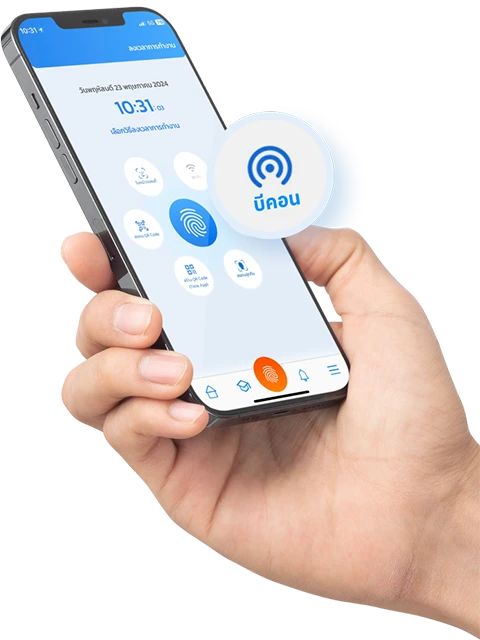
Choose Beacon clock-in
Open the HumanSoft app and choose clock-in by “Beacon”
-
Wait for the app to find the Beacon
When the phone is within about 70 meters, the app detects the Bluetooth signal from the Beacon device
-
Tap “OK” to clock in
Just get close to the Beacon to clock in, and you know for sure the employee is at the workplace
Walk into Beacon range and clock in instantly
Drag the “You” dot into the signal zone or tap “Walk into the office”, then tap “OK” on the phone to clock in
The map, names, and times in this demo are examples
Tap or drag on the map to move · Use the arrow keys when the map is selected · Scale is approximate
Searching for Beacon…
Updates instantly when you tap “OK”
Why use Beacon for time attendance
Easy to install
No wiring and no internet connection needed. Just set up the device and define the clock-in area in HumanSoft before use
Works even when GPS doesn’t
Works in areas where GPS is unavailable. No more lost signals or clock-in points that can’t be found
Accurate
Reduces time fraud and confirms employees are really at the workplace
Energy efficient
The device is designed to save power
Beacon is priced at 2,490 THB per unit
Time attendance devices are priced separately from the software plan. Available with the STANDARD plan and above

- Transmission
- Continuous Bluetooth
- Signal range
- About 70 meters
- Installation
- No wiring, no internet connection needed
- Works with
- HumanSoft Mobile Application
- Before first use
- Set up the clock-in device and define the clock-in area in HumanSoft
- Supported plans
- STANDARD · ADVANCED · PROFESSIONAL

1-year warranty
Our expert team supports Beacon usage and its connection to HumanSoft
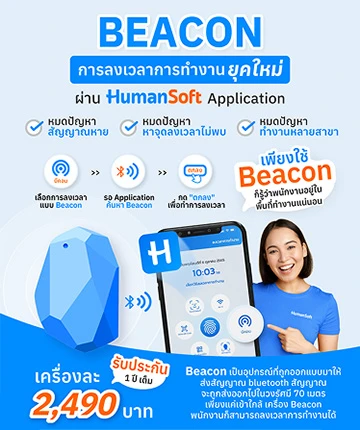
Beacon on one page
Clock-in steps, pricing, and warranty, ready to share with your team or management
Download the Beacon brochure (PDF opens in a new tab) See face and fingerprint scannersWhat is Beacon?
A Beacon is a wireless device that transmits a Bluetooth signal to receiving devices such as smartphones and tablets. It is a type of IoT, or Internet of Things, technology, and is now used for time attendance together with HR software
How does Beacon clock-in work?
Beacon continuously transmits a Bluetooth signal within a range of about 70 meters. When an employee’s smartphone is within range, the employee selects Beacon clock-in in the app, waits for the app to find the Beacon, then taps OK to clock in
How much does a Beacon cost?
2,490 THB per unit with a 1-year warranty. Time attendance devices are priced separately from the HumanSoft software plan.
Is Beacon difficult to install?
Installation is easy, with no wiring and no internet connection needed. Then set up the clock-in device and define the clock-in area in HumanSoft before you start
Why use Beacon for time attendance?
Beacon works in areas where GPS is unavailable, is accurate, reduces time fraud, and saves energy. It solves lost signals, clock-in points that can’t be found, and multi-branch work
Which plans support clock-in with a Beacon
Beacon clock-in is available in the STANDARD, ADVANCED, and PROFESSIONAL plans
 LINE