
Job Handover Before Resignation: Free Word/PDF Download
A handover form is a document a resigning employee uses to summarize their duties, task status and key files for the person taking over, with their supervisor and HR signing to acknowledge it. Download it free in both Word and PDF.
Table of Contents:
- What Is a Handover Form?
- Why Should Companies Use a Handover Form?
- What Should a Handover Form Include?
- How Do You Fill In a Handover Form Properly?
- Sample Handover Memo for Resigning Employees
- Download the Handover Form (Word / PDF)
- Summary: Hand Over Work Professionally
- FAQ : Frequently Asked Questions About Handover Forms
What Is a Handover Form?
A handover form, also called a job handover document, handover letter or simply a handover, is a document that collects and passes on information about a resigning employee's duties to the person who will take over. It can also be used to hand work over to a supervisor or manager who needs to know the status of each task before the employee leaves the organization.
In general, a pre-resignation handover is not a fixed requirement in company work rules. However, making it a standard practice keeps resignations orderly and reduces the impact on day-to-day operations.
Why Should Companies Use a Handover Form?
It helps an organization in 5 key ways.
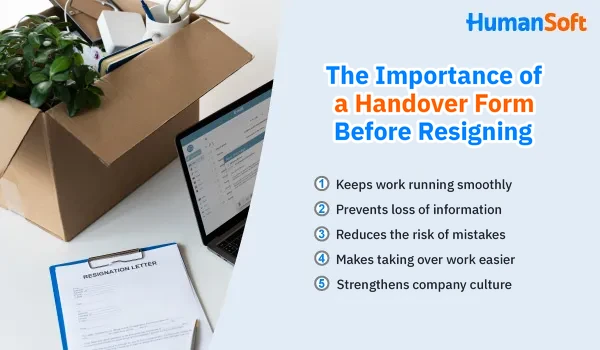
1. Keeps work running smoothly
When an employee resigns, the form makes sure all key information about their duties is passed on in full to the new person in charge, so work can continue without disruption, nothing is left pending and nothing is delayed.
2. Prevents loss of information
It lets the organization collect important information about tasks, projects and other details needed to do the job. Without it, key information may be lost or never reach the person who takes over.
3. Reduces the risk of mistakes
A detailed form makes the transfer of work smooth. The new person in charge can understand the work and carry it on correctly, which reduces the risk of mistakes caused by missing information or misunderstandings.
4. Makes taking over work easier
It lightens the load on the person taking over. They can quickly understand where each task stands without having to learn everything from scratch.
5. Strengthens company culture
Making a handover form part of the resignation process supports an organizational culture built on responsibility, professionalism and teamwork.
What Should a Handover Form Include?
A practical form should cover the 5 sections in this table.
| Section | What to fill in |
|---|---|
| 1. Company name | Name of the company or unit |
| 2. Reason for handover | Reason for the handover and effective date |
| 3. Employee details | Full name, employee ID, position, department, division, supervisor's name, and start date to last working day |
| 4. List of duties | Task, task type, work details, progress (%), related departments, supporting documents and notes |
| 5. Signatures | Handed over by, received by, HR and supervisor (acknowledged) |
How Do You Fill In a Handover Form Properly?
Follow these 5 steps so the person taking over can continue without coming back with questions.
- Fill in your details and the reason for sections 1–3, including the effective date.
- List every task including routine work, projects and pending items, one task per row.
- Add progress as a percentage and use the notes column to say what the next step is.
- Note the documents and file locations for each task, plus external contacts such as customers or suppliers.
- Walk through the work with the recipient then have the employee handing over, the recipient, HR and the supervisor sign.
Sample Handover Memo for Resigning Employees
If your company attaches a memo to the form, replace the text in brackets and it is ready to use.
Subject: Handover of duties due to resignation
To: [Supervisor's name]
I, [Full name], [Position], [Department], have submitted my resignation effective [Date]. I hereby hand over my duties to [Recipient's name], [Position], as detailed in the attached handover form.
Please be informed accordingly.
Signed ........................ Handed over by Signed ........................ Received by
Download the Handover Form (Word / PDF)
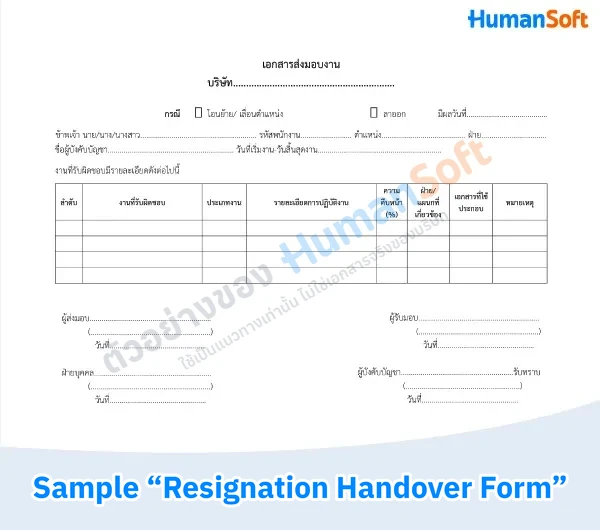
How to download and use it
- Go to File > Download > choose the file format you want.
- Or copy the form and paste it into your own Microsoft Word file.
Summary: Hand Over Work Professionally
A handover form keeps work moving the moment someone resigns, because it puts duties, progress and related documents in one place, signed by the employee handing over, the recipient, the supervisor and HR. Use the Word or PDF form above and follow the 5 steps to complete a full handover that also shows the resigning employee's professionalism.
FAQ : Frequently Asked Questions About Handover Forms
Q: How many days before the last working day should a handover start?
A: Start right after submitting your resignation and finish at least 1 week before your last working day, so the recipient has time to ask questions and try the work before you leave.
Q: Who should receive the handover if no replacement has been hired yet?
A: Hand the work over directly to your supervisor and note on the form that it is a temporary handover. Once a permanent replacement is found, the supervisor passes it on again using the same document.
Q: Can a company deduct or withhold pay if an employee does not hand over their work?
A: Generally no. Section 76 of the Labour Protection Act limits wage deductions to specific cases, and failing to hand over work is not one of them. Companies should instead set handover rules in their work regulations and follow up from the day a resignation is received.
Q: Should the return of company property be recorded in the handover document?
A: Yes, record it as a checklist attached at the end, such as laptops, employee ID cards, keys, office equipment and original documents, and have the person receiving them sign. This helps prevent disputes later.
Q: Can a handover document be signed online?
A: Yes. Electronic signatures are legally valid under the Electronic Transactions Act as long as the signer can be identified and the method is reliable, which makes them suitable for hybrid or remote teams.
Related articles
- Key elements of a resignation letter every HR team should know
- Q&A: Does a resignation need HR approval under Thai labor law?
- “Termination of status” vs “resignation”: What is the difference?
- Free employment certificate template and what employers and employees should know
- Free leave request form in Word/PDF, ready to use
