

How to File P.N.D.1 and P.N.D.1A Online for Employers and HR
Employers must file P.N.D.1 every month by the 15th of the following month, and P.N.D.1A once a year by February of the following year. Both forms can only be filed electronically. The most common method is to download a .txt file from your payroll software, convert it with the Revenue Department's RD Prep program, then upload it to e-Filing.
Below is a summary of how the 2 forms differ, how to download the file from HumanSoft, and how to file P.N.D.1 through RD Prep step by step.
Table of Contents:
- How to File P.N.D.1 and P.N.D.1A Online for Employers and HR
- What Is the Difference Between P.N.D.1 and P.N.D.1A?
- What Do You Need Before Filing P.N.D.1 Online?
- How Do You Download the P.N.D.1 / P.N.D.1A File from HumanSoft?
- How Do You File P.N.D.1 Through RD Prep?
- FAQ: Common Questions About Filing P.N.D.1 and P.N.D.1A
What Is the Difference Between P.N.D.1 and P.N.D.1A?
P.N.D.1 is the form for remitting the salary tax withheld each month. P.N.D.1A (also written P.N.D.1 Kor) is the annual summary of every employee's income and tax withheld for the year. Both cover income under Section 40(1) and 40(2), such as salary, wages and bonuses.
|
Topic |
P.N.D.1 |
P.N.D.1A |
|
Purpose |
Remit the tax withheld from that month's salaries |
Summarize income and tax withheld for the whole year |
|
How often |
Every month |
Once a year |
|
Deadline |
By the 15th of the following month |
By February of the following year |
|
Who is listed |
Employees whose tax was withheld that month |
Every employee who received income that year, even below the tax threshold |
|
How to file |
Electronically only (e-Filing, e-Withholding Tax or electronic file submission) since the January 2024 tax month |
|
Read more: P.N.D.1 vs P.N.D.1A: Differences and Deadlines · Revenue Department Ends Paper Filing of P.N.D.1 and P.N.D.1A
What Do You Need Before Filing P.N.D.1 Online?
Prepare 3 things: the tax data file from your payroll software, the RD Prep program, and your company's e-Filing account.
- P.N.D.1 or P.N.D.1A file (.txt): a file listing employees, income and tax withheld, downloaded from your payroll software.
- RD Prep: the Revenue Department's program that converts the .txt file into an .rdx file for upload. See how to install it at How to Convert Withholding Tax Files for Online Filing
- e-Filing account: your company must register for online filing with the Revenue Department first.
How Do You Download the P.N.D.1 / P.N.D.1A File from HumanSoft?
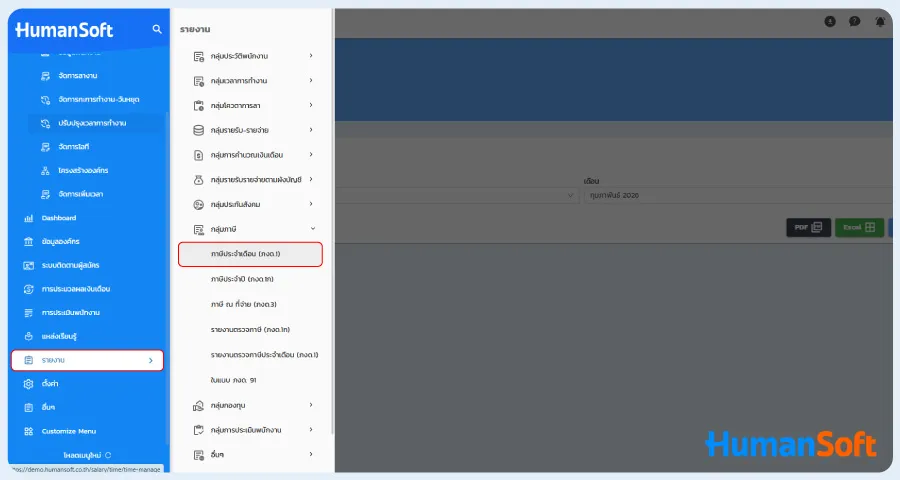
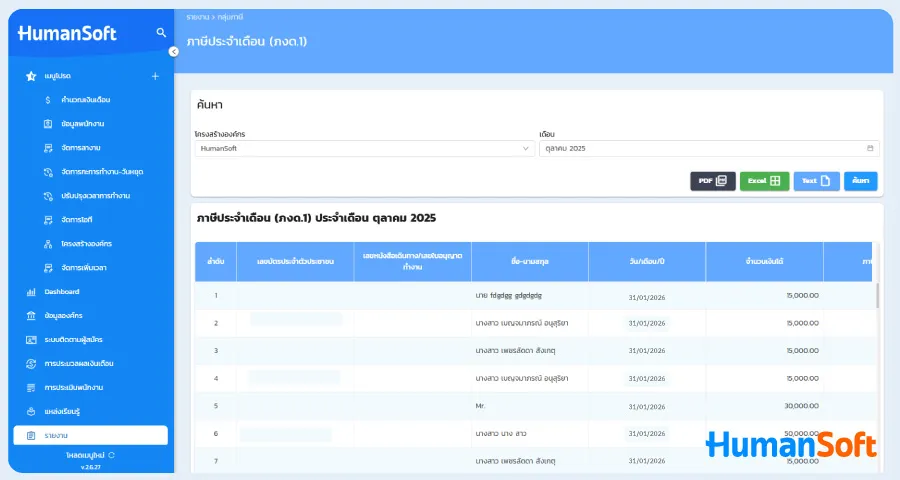
In HumanSoft payroll software, go to Reports > Tax group, then choose "Monthly tax (P.N.D.1)" for P.N.D.1 or "Annual tax (P.N.D.1A)" for P.N.D.1A. Then choose the month or year you need, and the system downloads a .txt file ready to use with RD Prep.
How Do You File P.N.D.1 Through RD Prep?
Convert the file in RD Prep in 6 steps, then upload the result to e-Filing in step 7.
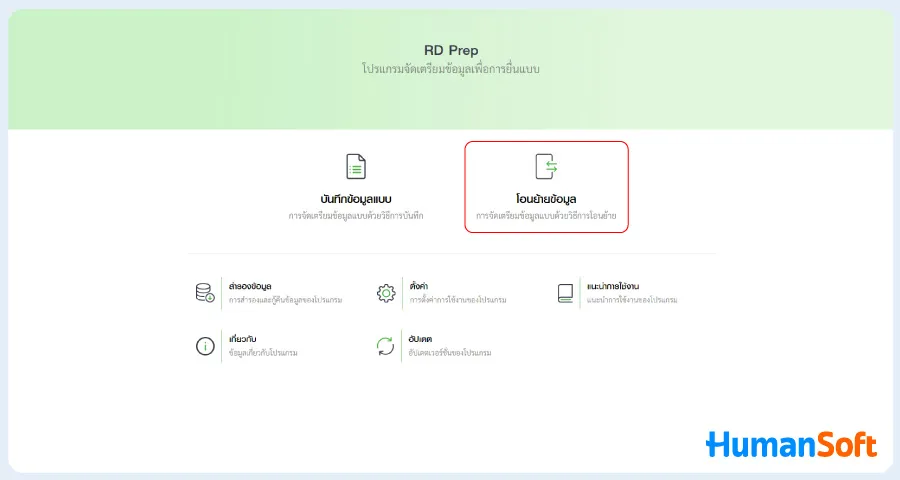
Step 1: Choose the Data Transfer Menu
Open RD Prep and choose the "data transfer" menu.
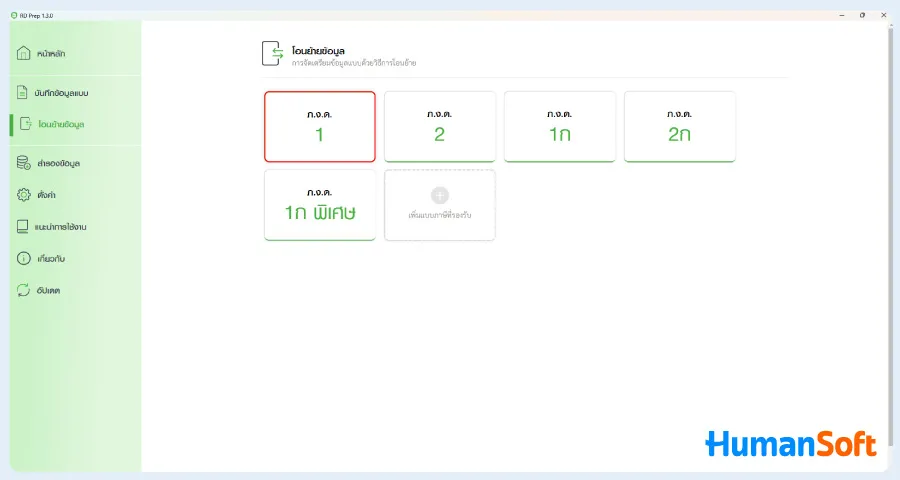
Step 2: Choose the P.N.D.1 Form
Choose P.N.D.1 from the list of forms to convert.
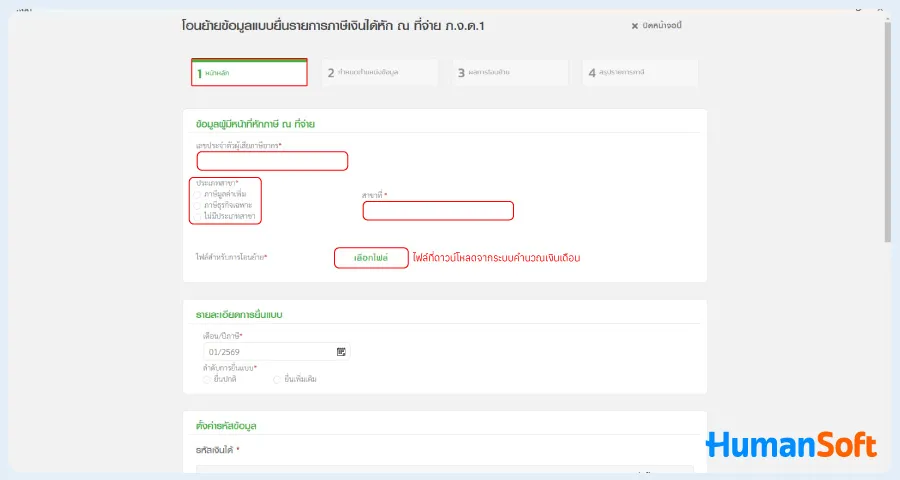
Step 3: Fill In the Main Page
Enter the details of the company withholding the tax and select the file you downloaded.
- The company's taxpayer ID number, branch type and branch number (if any).
- Upload the P.N.D.1 file downloaded from HumanSoft.
- Filing type: normal filing or additional filing.
- Income code and withholding tax condition code.
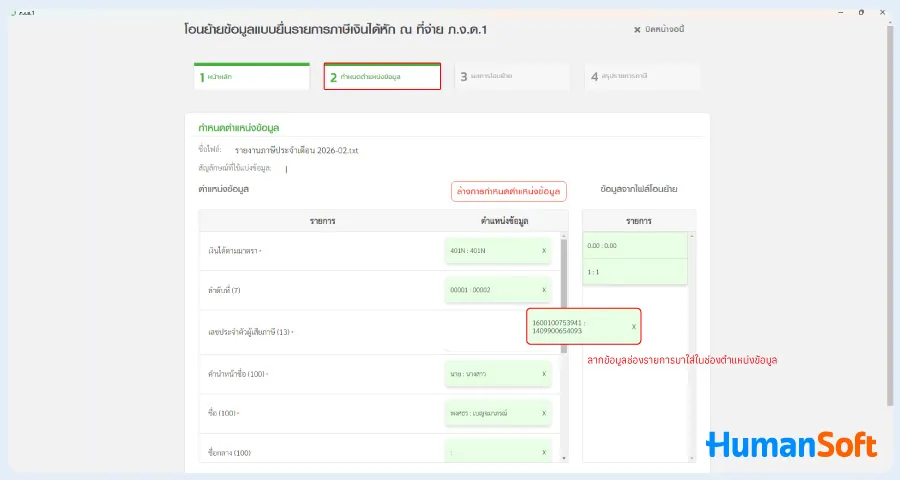
Step 4: Map the Data Fields
The left side shows "data positions" and the right side shows "items". Match each item on the right to the correct position on the left by data type, such as taxpayer ID, name, income and tax withheld.
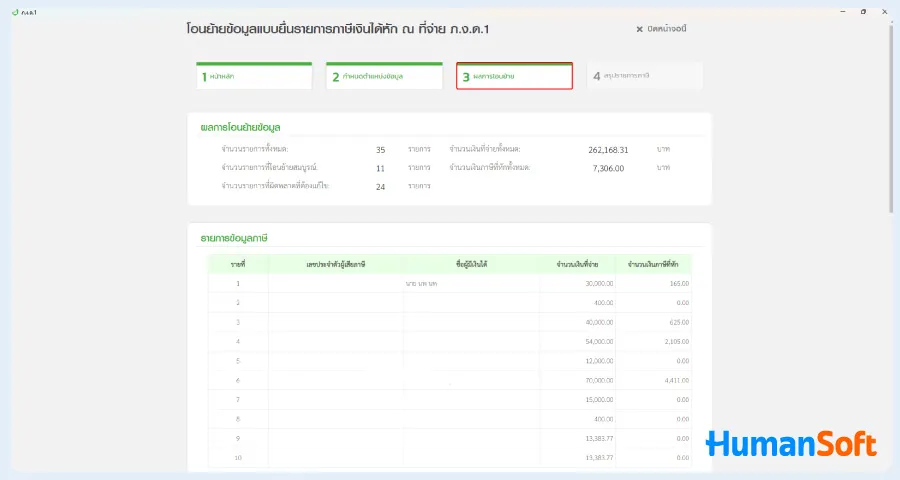
Step 5: Check the Data
Check that the tax items to be remitted are complete. If any item is wrong, the system shows how many items need fixing. Go back and fix them first.
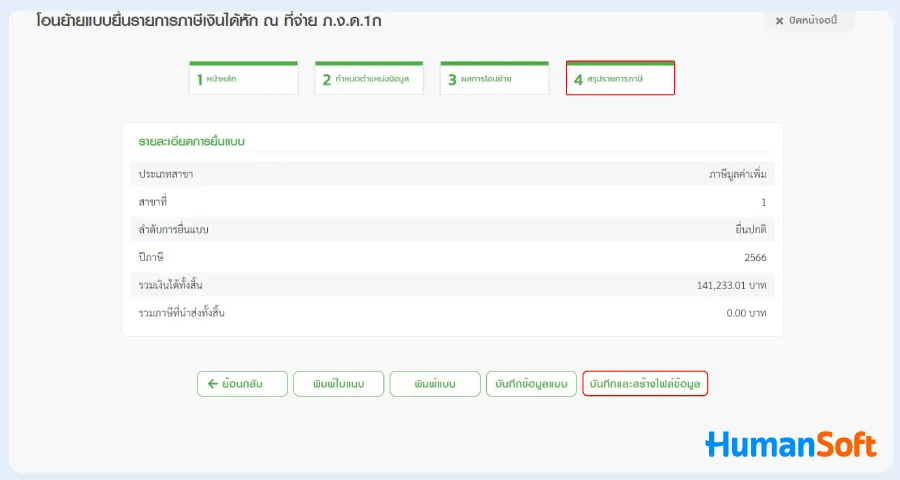
Step 6: Save the Data
Once the data is correct, print the attachment, print the form and save the data. You now have the file to upload to e-Filing.
Step 7: Upload the File to e-Filing
Go to efiling.rd.go.th, log in with your company account, choose to file P.N.D.1 and upload the file converted in RD Prep. Then check the tax amount and pay it by the deadline.
Filing P.N.D.1A through RD Prep follows similar steps. See the full guide at How HR Files P.N.D.1A
FAQ: Common Questions About Filing P.N.D.1 and P.N.D.1A
Q: When are P.N.D.1 and P.N.D.1A due?
A: P.N.D.1 is due by the 15th of the month after salaries are paid. P.N.D.1A is due by February of the following year.
Q: Can I still file P.N.D.1 on paper?
A: Not normally. Since the January 2024 tax month, P.N.D.1 and P.N.D.1A must be filed electronically. If you genuinely cannot file electronically, you must file on paper with a letter to the Revenue Department explaining why.
Q: What is withholding tax?
A: It is tax that the payer, such as an employer, deducts from the income of the recipient, such as an employee, and remits to the Revenue Department on their behalf. Tax withheld from salaries is remitted with P.N.D.1.
Q: If no employee had tax withheld this month, do I still file P.N.D.1?
A: If salaries were paid that month, you must file P.N.D.1 even if the tax to remit is 0 baht, to report the information to the Revenue Department.
Q: What happens if P.N.D.1 is not filed or is incomplete?
A: The employer becomes jointly liable with the employee for the tax that was not withheld or not fully remitted, and may also have to pay a surcharge and fines under the law.
Related articles
