
What Should a Timesheet Include? Free Word Template
A timesheet is a document employees use to record their daily clock-in and clock-out times. HR uses it to calculate wages and overtime pay and retain evidence of work performed. A timesheet that serves as supporting evidence must include at least seven fields: a form header, date, full name, clock-in time, clock-out time, work details, and signature.
Table of Contents:
- What Should a Timesheet Include? Free Word Template
- What Fields Should a Timesheet Include?
- How Do You Complete a Timesheet So It Can Serve as Evidence?
- Why Are Timesheets Important?
- What Does Thai Labor Law Require for Working Time Records?
- How Do Paper Timesheets Compare with Online Attendance Systems?
- How Do You Download the Free Word Timesheet Template?
- Summary: Download a Free Word Timesheet Template
- Frequently Asked Questions About Timesheets
What Fields Should a Timesheet Include?
A timesheet used as supporting evidence should include at least the seven fields listed below. If you create your own form or customize the free template, check that every field is included.
| Field | What to Enter | Purpose |
|---|---|---|
| Form header | Company or department name, month, and year | Identifies the organization and the month covered |
| Day/Month/Year | Date worked | Tracks workdays, absences, and leave days |
| Full name | Employee name (or employee ID) | Identifies the employee recording their time |
| Clock-in time | Actual start time | Checks lateness and calculates working hours |
| Clock-out time | Actual finish time | Calculates working hours and overtime pay (OT) |
| Work details | Tasks performed or notes, such as off-site work or half-day leave | Explains unusual time entries and supports performance reviews |
| Signature | Employees sign each time they record their time, and the reviewer signs at the bottom of the sheet | Confirms that the entries belong to the employee concerned |
How Do You Complete a Timesheet So It Can Serve as Evidence?
The key is to record actual times immediately upon arrival and departure and leave a clear record of any corrections. Follow these six steps:
- HR completes the form header, department name, month, and year before the first day of the reporting period.
- Employees record their arrival time as soon as they reach the workplace and their departure time before leaving, using a pen rather than a pencil.
- Record the actual hour and minute, such as 08:47, without rounding it to 09:00.
- Do not leave blank rows or enter times in advance.
- If you make a mistake, cross it out, write the correction, and sign beside it. Do not use correction fluid.
- At the end of the month, the supervisor checks and signs the bottom of the sheet, then sends it to HR for payroll calculations.
Why Are Timesheets Important?
Timesheets benefit both HR and employees in four main ways:
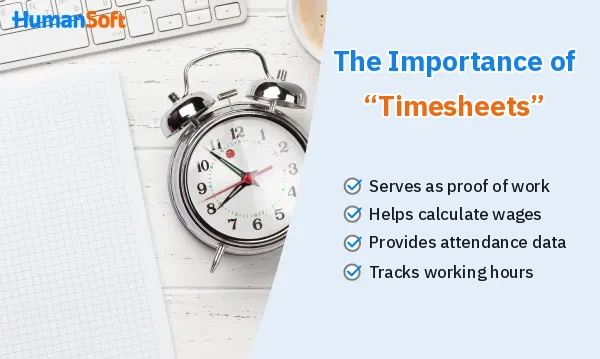
1. Providing Evidence of Work
They confirm the dates and times employees actually worked. If an error or misunderstanding arises, both employees and employers can use them as evidence.
2. Calculating Wages
HR uses workdays and working hours to calculate wages and other compensation, such as allowances attendance bonuses and overtime pay.
3. Supporting Statistical Analysis
Attendance data helps HR track leave accurately, including sick leave, annual leave, and maternity leave. It can also help identify the causes of issues such as recurring absences during certain periods.
4. Monitoring Working Hours
Supervisors can check whether employees arrive on time, how many hours they work each day, and whether they work overtime, helping them plan staffing and improve operations.
What Does Thai Labor Law Require for Working Time Records?
The Labor Protection Act B.E. 2541 (1998) requires employers to retain working time records as evidence. The key requirements are summarized below:
- Section 114 Employers with 10 or more employees must prepare documents relating to the calculation and payment of wages, overtime pay, holiday pay, and holiday overtime pay. These documents must include, at a minimum, employees’ workdays and working hours.
- Section 115 These documents must be retained for at least two years from the date wages are paid.
Timesheets therefore serve as source records for payroll documents. If a company uses an online attendance system, its records can serve the same purpose, provided that historical data can be retrieved and printed.
How Do Paper Timesheets Compare with Online Attendance Systems?
Paper timesheets suit small teams that are just starting to keep records. Online systems reduce the work of totaling hours and can pass the data directly to payroll.
| Topic | Paper Timesheet (Word) | Online Attendance System |
|---|---|---|
| Cost | Minimal: a free template and paper | Usually involves a monthly subscription fee |
| Totaling Hours and OT | HR totals each sheet manually | The system calculates the totals |
| Reliability | Depends on employees recording their time honestly and supervisors checking it | The system records the time when employees clock in or out, with records available for review |
| Transferring Data to Payroll | Data must be entered again into payroll software or Excel | Can connect to a payroll system |
| Best Suited For | Shops, small teams, and work at a single location | Companies with employees across multiple branches or working off-site |
If you are looking for an attendance system, explore how to choose the right attendance system for your organization or learn about HumanSoft’s online attendance system which connects working time records with payroll calculations in one system.
How Do You Download the Free Word Timesheet Template?
If paper timesheets suit your team, you can use this template for free. It is a monthly form that accommodates multiple employees on one sheet, with fields for the date, full name, clock-in time, clock-out time, work details, and signature, plus a reviewer’s signature at the bottom.
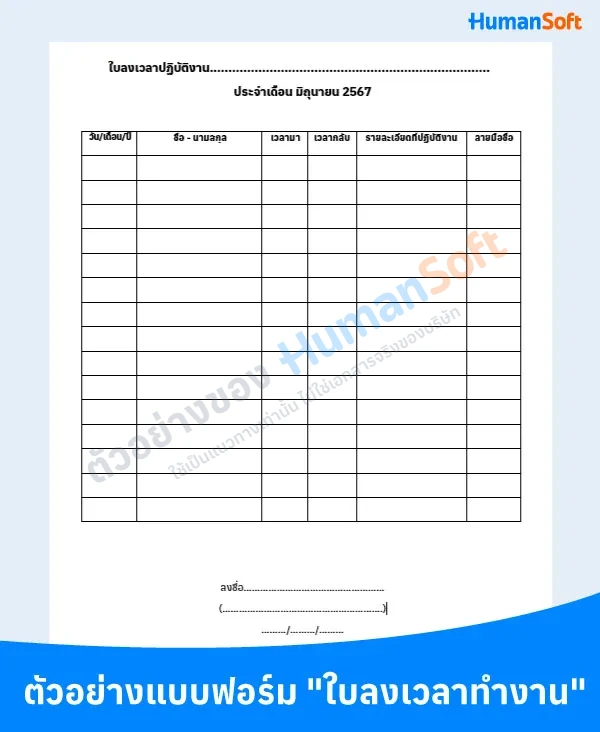
- Click Download the Timesheet Template to open the file in Google Docs.
- Go to File > Download > Microsoft Word (.docx).
- Open the file in Word, edit the department name, month, and year, then print it.
Summary: Download a Free Word Timesheet Template
A timesheet records employees’ daily clock-in and clock-out times. It provides supporting evidence, helps calculate wages and OT, and tracks leave usage. A good template must include at least seven fields: a form header, date, name, clock-in time, clock-out time, work details, and signature. Under Thai labor law, employers with 10 or more employees must retain workday and working hour records for at least two years. Download the Word template above to use it for free.
Frequently Asked Questions About Timesheets
Q: Should I Use a Daily or Monthly Timesheet?
A: A daily timesheet uses one sheet per day, with everyone signing the same sheet. It suits workplaces where employees arrive and leave at the same time. A monthly timesheet uses one sheet per employee per month, making it easier to total each person’s working hours.
Q: How Should Employees Record Time When Working from Home or Off-Site?
A: Paper timesheets are inconvenient in these situations. Use an attendance app to record time on a mobile phone, or ask employees to report their start and finish times by email or chat for their supervisor to verify.
Q: Should Daily-Paid or Part-Time Employees Record Their Time?
A: They should record their time every time they work. This is even more important than for monthly-paid employees because their wages depend on the actual days or hours worked. Without time records, wage calculations become difficult and disputes are more likely.
Q: Can I Customize the Template for My Company?
A: Yes. Every part of the Word file can be edited. For example, you can add a logo, columns for break times, OT hours, or leave types, and replace the name field with an employee ID field.
Q: Is Timesheet Information Personal Data?
A: Yes. Names and clock-in and clock-out times can identify employees, so they fall under the Personal Data Protection Act (PDPA). Keep these records secure and restrict access to authorized personnel.
Read More Related Articles


