

7 HR Software Features That Reduce HR Workload
HR software simplifies workforce management, from employee data, attendance, documents, and payroll calculations to KPIs and benefits. It reduces manual work and errors while connecting HR data in one system.
Table of Contents:
- 7 HR Software Features That Reduce HR Workload
- How Does HR Software Support HR Teams?
- 7 HumanSoft HR Software Features That Reduce HR Workload
- What Are the Key Advantages of These 7 HumanSoft HR Software Features?
- Summary: 7 HR Software Features That Reduce HR Workload
- Frequently Asked Questions About HR Software
How Does HR Software Support HR Teams?
Office-based businesses, such as accounting firms, event organizers, and service companies, often face similar HR management challenges. HR teams spend considerable time on routine tasks, especially payroll calculations and data collection, including:
- Inconsistent employee clock-in and clock-out times due to flexible work arrangements
- Difficulty monitoring employees who work off-site
- Large volumes of leave, shift change, and OT requests that can easily be overlooked
- Time-consuming payslip preparation
- Lack of a systematic employee benefits management process
- Difficulty evaluating performance and making appropriate salary adjustments
Comprehensive HR software reduces manual processes and connects essential information in one system. This reduces repetitive workloads, gives HR more time for people development, and improves organizational efficiency.
7 HumanSoft HR Software Features That Reduce HR Workload
1. Total-Hours-Based Shift Scheduling
The shift scheduling feature based on total hours allows HR to set the required number of working hours per day while employees choose clock-in and clock-out times that meet the conditions. For example, an employee may work from 10:30 a.m. to 7:30 p.m. to complete eight hours. This reduces attendance checks and simplifies the management of flexible working arrangements.
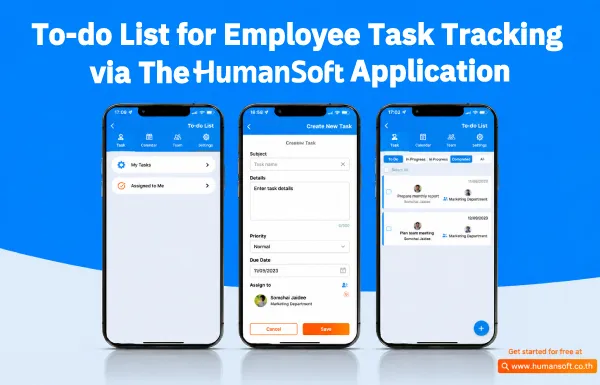
2. Track Employee Tasks with a To-Do List
What are employees working on? Have they completed the task? Did they actually visit the client? These are common questions for HR teams, supervisors, and business owners. The To-Do List feature allows supervisors to assign tasks, track progress, and monitor employee work in real time through the application.
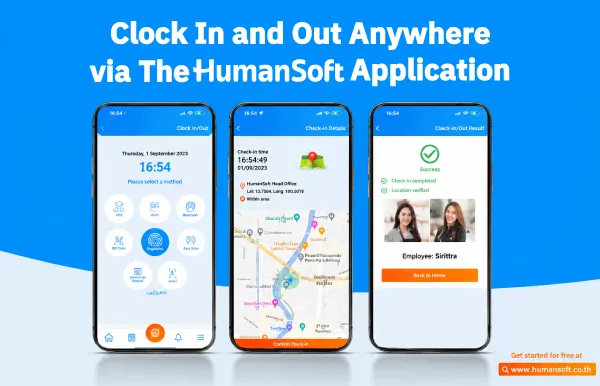
3. Attendance with Check-In Everywhere
For organizations with Work from Home or Work from Anywhere arrangements, traditional attendance methods may not be suitable. The attendance feature with Check-In Everywhere allows employees to clock in and out through the application from any location. It reduces attendance verification steps and helps HR manage working-time data more conveniently.
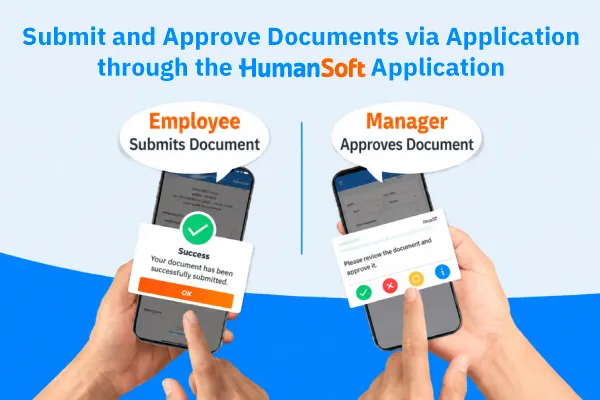
4. Submit and Approve Documents via the Application
Handling large volumes of documents, such as leave requests, OT requests, and other forms, can be time-consuming for HR and prone to errors. The document submission and approval feature in the application allows employees to submit requests through the system and supervisors to approve them conveniently from anywhere. It reduces paperwork and follow-up steps while helping HR work faster.
5. KPI Evaluation
The KPI evaluation feature helps organizations set performance indicators, collect performance data, and evaluate employees systematically. It supports multiple KPI formats, evaluation weightings, and different business models, improving transparency in performance reviews.
6. Issue Online Payslips
Preparing payslips for employees each month is another time-consuming, multi-step HR task. The online payslip feature allows employees to check and view their payslips instantly through the application.
7. Automate Employee Benefits Management
The benefits management feature allows HR to configure and manage benefits systematically, including medical, travel, vacation, and other allowances. Employees can submit reimbursement requests themselves through the application, reducing HR workload and making benefits administration more efficient.
What Are the Key Advantages of These 7 HumanSoft HR Software Features?
| Feature | Key Advantage | Organizational Benefit |
| Employee Data | Centralizes workforce information | Easy to find and manage |
| Attendance | Supports multiple attendance methods | Reduces verification time |
| Online Documents | System-based approvals | Reduces paperwork |
| Payroll Calculation | Manages payroll, taxes, social security, OT, earnings, and deductions in one system | Improves calculation accuracy and reduces errors |
| KPI | Performance Evaluation | Improves transparency |
| Mobile App | Accessible from anywhere | Reduces routine HR work |
*Information as of September 2026
Summary: 7 HR Software Features That Reduce HR Workload
The features described above play an important role in solving workforce challenges and helping businesses grow efficiently. With HumanSoft and its features designed to address HR challenges, organizations can manage operations and achieve business goals more smoothly. HumanSoft HR Software is therefore an essential platform for managing HR in office-based businesses.
Frequently Asked Questions About HR Software
Can employee data be imported from Excel into HR software?
Yes. Most HR systems support importing employee data from Excel files, reducing the time spent entering information manually.
Does HR software need to be installed, or can it be used online?
Most HR software is cloud-based and does not require installation on a computer, allowing HR teams and employees to access information from anywhere.
Can HR software set data access permissions for different roles?
Yes. HR systems can assign data access permissions by role, such as HR, supervisors, and employees, to help protect information.
Read More Related Articles



