
How to Choose Affordable and Cost-Effective HR Software for Startups
Startups should choose HR software that is appropriately priced for their current number of employees while still supporting essential functions such as employee data, Payroll, tax, Social Security, Time Attendance, shift management, leave, and OT.
They should also consider how costs will change as the team grows, the level of customer support available, and whether additional features can be added later. Choosing a scalable system can help avoid the need to migrate to a new platform as the business expands.
What Are the Benefits of Affordable HR Software?
Today, startups are placing greater importance on human resource management and increasingly using HR software to reduce administrative workload.
The main benefits include:
- Easier payroll calculations: Reduce the number of manual calculation steps.
- Less workload for HR teams and business owners: Especially for repetitive monthly tasks.
- More organized employee data: Information becomes easier to search, review, and manage.
- Fewer errors: Reduce mistakes caused by manual data entry or calculations.
- Time savings: Allow HR teams to spend more time on other important people-related activities.
- Flexible package options: Businesses can select a package based on their budget and actual requirements.
Why Should Startups Use HR Software?
Because affordable payroll software is easy to use, it can help businesses manage everything from salary and wage payments to time attendance tracking. It also stores employee data accurately, reliably, and transparently, allowing employees to review their own personal information. This helps save time and simplifies document management by reducing unnecessary administrative steps.
What Key Payroll Software Features Can Improve Efficiency for Startups?
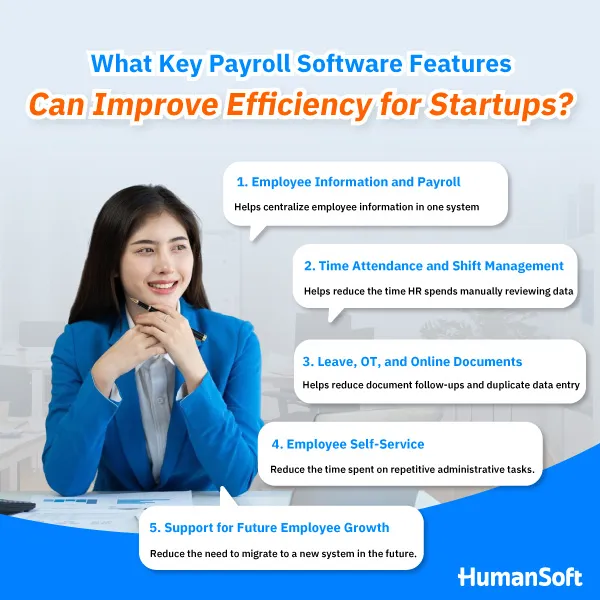
1. Employee Information and Payroll
This feature brings together employee information, salaries, earnings, deductions, tax, and Social Security data within a single system.
HR teams do not need to repeatedly enter the same information across multiple files, making it easier to review payroll data before closing each payroll cycle.
A centralized employee and Payroll database also helps reduce duplicated work and keeps important payroll information more organized.
2. Time Attendance and Shift Management
The system helps record employee clock-in and clock-out times and assign appropriate shifts to different groups of employees.
Accurate attendance data directly affects calculations such as:
- Wages
- OT
- Late attendance
- Early departures
By connecting attendance information with Payroll, HR teams can spend less time manually reviewing working-hour records before calculating employee compensation.
3. Leave, OT, and Online Documents
Employees can submit leave requests, request OT, or send other documents directly through the system.
Managers can then review and approve these requests according to the configured workflow.
Once approved, HR can immediately use the information for Payroll processing. This helps reduce document follow-ups and avoids entering the same information repeatedly into different systems or files.
4. Employee Self-Service
Employee Self-Service enables employees to manage certain HR activities by themselves, such as:
- Reviewing their personal information
- Submitting documents
- Checking leave balances
- Viewing payslips
This reduces routine questions and requests that would otherwise need to go through HR at every step.
For startups with relatively small HR or back-office teams, Employee Self-Service can help HR spend more time on higher-value work instead of repetitive administrative tasks.
5. Support for Future Employee Growth
A startup may begin with a small team, but as the business grows, the number of employees, work shifts, and Payroll conditions can become increasingly complex.
A system that can support more employees and allow additional features to be added as needed can reduce the need to migrate to another HR platform in the future.
Is Payroll Software Better Than Managing Payroll Manually for Startups?
| Area | Excel / Manual Process | Payroll Software |
|---|---|---|
| Initial Cost | Low | Service fee based on the selected package |
| Payroll Processing | The business owner or HR collects data manually and calculates Payroll using formulas | Information is stored in one database and employee work data can be connected for automated calculations within the same system |
| Document Management | Documents are stored as paper records or separate files | Documents can be submitted, approved, and stored online within the system |
| Historical Review | HR may need to search through multiple files | Information can be reviewed more easily within one system |
| Best Suited For | Very small teams with simple processes | Startups looking to establish a scalable HR system for long-term use |
How Is HumanSoft Suitable for Startups That Want to Build a Structured HR System?
During the early stages of a startup, HR processes may still be manageable with Excel or free tools.
However, as the number of employees increases, Payroll, Time Attendance, leave, OT, and employee documents become increasingly interconnected.
Choosing a system that can add functionality as the business grows can reduce the likelihood of having to migrate employee data to a new platform later.
HumanSoft supports:
- Payroll calculations
- OT calculations
- Special payroll cycles
- Tax
- Social Security
- Funds
- Commissions
It also includes additional functions covering broader HR processes.
According to the source, HumanSoft currently offers packages ranging from Basic, which focuses on Payroll, tax, Social Security, and employee information, to Standard, Advanced, and Professional, which provide additional features such as employee documents, shift management, Onboarding, performance evaluation, employee benefits, and other HR tools depending on the selected package.
Summary: How to Choose Affordable and Cost-Effective HR Software for Startups
Startups should choose HR software based on total cost and the features they actually need, rather than simply selecting the provider with the lowest service fee.
At a minimum, the system should support:
- Employee information
- Payroll
- Time Attendance
- Leave
- OT
- Data review and verification
The software should also be able to support additional functions or a larger number of employees as the business grows.
FAQ Frequently Asked Questions About HR Software for Startups
Should startups test HR software before purchasing it?
Yes. Startups should test the system using actual data and real workflows.
Does a startup with fewer than 10 employees need HR software?
Not necessarily.
If the workflow is still simple, the company can begin with basic tools. However, HR software should be considered when the team starts entering the same information repeatedly or when Payroll, OT, and employee-document processes become more complex.
What features should affordable HR software for startups include?
At a minimum, it should include:
- Employee information
- Payroll
- Time Attendance
- Leave
- OT
- Payslips
- Data access permissions
If the startup plans to grow, it should also check whether additional functions or higher-level packages can be added later without changing systems.
Read more related articles.



