
How Does Payroll Software Calculate Different Types of Employee Pay?
Payroll software calculates pay for different types of employees based on individual conditions, such as pay rates, pay periods, working hours, earnings, and deductions, to determine each employee’s net pay for the period.
An organization may employ monthly-paid, daily-paid, and part-time workers, as well as employees with special compensation arrangements. Applying the same formula to everyone may result in inaccurate wages, overtime pay, or deductions.
Payroll software makes it easier and more accurate to calculate different types of pay while reducing the risks associated with manual calculations.
Table of Contents:
- How Does Payroll Software Calculate Different Types of Employee Pay?
- What Are the Different Types of Employee Pay?
- How Does Payroll Software Calculate Different Types of Pay?
- How Is Payroll Software Different from Manual Payroll Calculations?
- How Can HumanSoft Payroll Software Help?
- Summary: How Does Payroll Software Calculate Different Types of Pay?
- FAQ: Calculating Different Types of Employee Pay
What Are the Different Types of Employee Pay?
Different types of employee pay refer to the various wage and compensation arrangements used for employees within an organization, such as:
- Monthly-paid employees receive a fixed monthly salary.
- Daily-paid employees are paid based on the number of days worked and the applicable payment conditions.
- Part-time employees are paid based on the actual hours or days worked at company-defined rates.
- Fixed-fee employees receive compensation based on their employment agreement or agreed payment conditions.
- Employees with multiple income components may receive a salary, commissions, attendance incentives, travel allowances, or shift allowances.
How Does Payroll Software Calculate Different Types of Pay?
Payroll software processes each employee’s information and conditions in six steps:
1. Check Employee Types and Base Pay
The system starts with basic employee information, including:
- Employee type
- Base salary or wage rate
- Employment start date and termination date
- Effective date of salary adjustments
- Branch, department, position, or employee group
- Payment arrangement, such as a full pay period or split pay periods
This information allows the system to apply the appropriate calculation conditions to each employee.
2. Set Payroll Periods and Work Calendars
HR must accurately define the start and end dates of each payroll period, since attendance records, leave, and employee-submitted documents during that period are used in payroll calculations. If the organization has multiple payment schedules, the system calculates pay according to the period assigned to each employee, such as a full-month or split-period schedule.
3. Integrate Attendance, Leave, and Overtime Data
The system uses the following information in its calculations:
- Clock-in and clock-out times
- Number of days or hours worked
- Late arrivals or early departures
- Absences and different types of leave
- Overtime (OT)
- Work shifts and shift allowances
- Holidays on the company calendar
4. Include Relevant Earnings and Deductions
After calculating basic pay, the system adds up each employee’s earnings and deductions.
| Earnings | Deductions |
|---|---|
| Salary or wages | Deductions for time not worked, such as absences, unpaid leave, late arrivals, or early departures |
| Overtime pay (OT) | Withholding income tax |
| Commissions | Social Security contributions |
| Position allowances | Provident fund contributions |
| Cost-of-living allowances | Employee-authorized loan or debt deductions |
| Travel allowances | Salary advances |
| Attendance incentives and other earnings | Other deductions permitted by law and company policy |
Note: Leave that must be paid by law, such as up to 30 working days of paid sick leave per year, cannot be deducted from wages. Wage deductions must comply with Section 76 of the Labour Protection Act.
5. Calculate Net Pay
The general calculation is as follows:
Net Pay = (Applicable Wages + Overtime Pay + Other Earnings) − Total Deductions
Total deductions include deductions related to working time, withholding tax, Social Security contributions, fund contributions, and the other items listed in the table above. Payroll software calculates these automatically. Even employees with identical base salaries may receive different net pay because their working hours, additional earnings, deductions, and tax conditions differ.
6. Review Results Before Closing the Payroll Period
HR can review the calculation for each employee, including personal details, base salary, payroll period, and the data used by the system. If an inconsistency is found, HR can correct the source data and recalculate or reset the information before closing the payroll period.
How Is Payroll Software Different from Manual Payroll Calculations?
Payroll software reduces repetitive tasks at every stage, from classifying employees to generating payslips, as shown below.
| Payroll Process | Manual Calculation | Payroll Software Calculation |
|---|---|---|
| Classifying employees | Separate files or formulas must be created for monthly-paid, daily-paid, part-time, and fixed-fee employees. | Employee types and payment conditions are configured individually in the system. |
| Calculating basic wages | HR must select formulas and enter wage rates manually. | The system calculates pay using the configured base salaries, wage rates, and conditions. |
| Checking attendance | Attendance, shifts, absences, leave, late arrivals, and OT must be collected from multiple sources. | Attendance, leave, shifts, and OT data are linked to the payroll period. |
| Calculating earnings and deductions | Commissions, attendance incentives, benefits, and deductions must be entered into files. | Recurring and monthly variable earnings and deductions can be configured. |
| Calculating taxes and contributions | Formulas must be updated and calculation bases checked manually. | Configured items are used to calculate taxes, Social Security, and fund contributions. |
| Preparing payslips and reports | Data must be separated and additional documents prepared. | Calculation results are used to generate payslips and related reports. |
*Information as of October 2026
How Can HumanSoft Payroll Software Help?
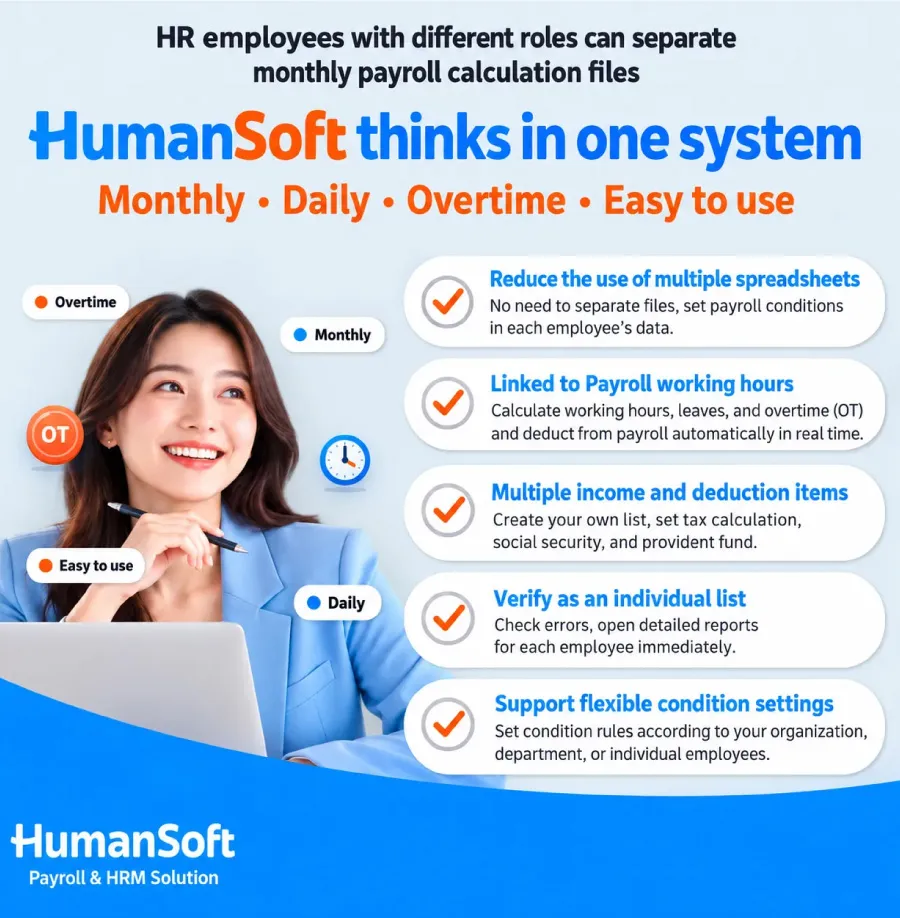
HumanSoft payroll software supports grouping and changing employee types, such as switching from part-time to monthly-paid or fixed-fee employment. This allows organizations to manage different employment arrangements in one system, with the following additional benefits:
Reduce the Need for Multiple Formulas
HR does not need separate files for monthly-paid, daily-paid, or part-time employees because conditions can be set in each employee’s profile.
Connect Attendance Data with Payroll
Shift, attendance, leave, and OT data can be used directly in payroll calculations, reducing the need to copy information between systems.
Support Various Earnings and Deductions
Organizations can create pay items based on their policies and specify which items are included in tax, Social Security, or fund calculations.
Review Each Employee Individually
If an amount appears incorrect, HR can open that employee’s details immediately instead of reviewing an entire file.
Support Organizations with Complex Requirements
Certain conditions can be configured at the organization, branch, or individual level, making the system suitable for businesses with different employee groups.
Summary: How Does Payroll Software Calculate Different Types of Pay?
Payroll software calculates pay for different employee types by applying each employee’s conditions, including employee type, base pay, payment schedule, working hours, earnings, deductions, taxes, Social Security, and fund contributions, to determine individual net pay.
HumanSoft helps organizations manage monthly-paid, daily-paid, part-time, fixed-fee, and multi-component compensation arrangements in a single system. HR must correctly configure employee data and company policies before running payroll so results match each employee’s applicable conditions.
FAQ: Calculating Different Types of Employee Pay
Q: How does the system calculate a salary adjustment made mid-month?
A: Payroll software that supports effective dates for salary changes calculates pay using the old and new rates before and after the adjustment date. HR must configure the divisor according to company policy.
Q: Can payroll be calculated for employees who join or leave mid-month?
A: Yes. HR can define the prorating method for new hires or departing employees, such as dividing by 26 days, 30 days, or the actual number of days, according to company policy.
Q: Can incorrect payroll information be corrected after calculation?
A: Yes. If the payroll period is still in a status that allows edits, HR can correct the source information and recalculate or reset the data.
Q: How are retroactive earnings or back pay recorded?
A: Create or select an earnings category appropriate to the payment, specify the relevant payroll period and employees, and review the tax treatment before calculation.
Q: Can certain earnings be excluded from Social Security calculations?
A: Yes. When configuring earnings and deductions, HR can specify whether each item is included in tax, Social Security, fund, or special payroll period calculations.
Read More Related Articles
Can Payroll Software Calculate Daily Employee Wages?
Q&A: How Should HR Calculate Daily Employee Wages?
Can Payroll Software Calculate Daily Employee Wages?
How to Calculate Monthly Employee Salaries Under Thai Law
How to Calculate Daily and Monthly Overtime Pay Under Thai Labour Regulations



