
What Business Tools Should Every Owner Have?
Business tools for owners fall into 7 groups: accounting and finance, HR and payroll, time and leave tracking, point of sale (POS), customer relationship management (CRM), online marketing, and team collaboration. You don't need all of them on day one. Start with the work that eats most of your time and is required by law, which usually means accounting, tax, and payroll.
This guide covers what each group of tools does, which ones to get first at each stage of your business, and what to check before you buy, so you don't end up paying for software nobody uses.
Table of Contents:
- What Business Tools Should Every Owner Have?
- What are business tools, and why do owners need them?
- Which business tools should every owner have?
- Which business tools should you start with at each stage?
- How do you choose business tools without wasting money?
- Which tasks are required by law and need a system behind them?
- Summary: the business tools every owner should have
- FAQ: Common questions about business tools
What are business tools, and why do owners need them?
Business tools are software, apps, or online systems that get routine work done faster, with fewer mistakes, and give the owner up-to-date numbers without having to chase staff for every answer.
Many small businesses start out with a notebook, a few Excel files, and a LINE group. That works fine with a handful of staff. But once you open a second branch, hire more people, or take more orders, the same problems keep coming back:
- You don't know your real profit this month because income and expenses are spread across too many places.
- Every payday means a late night adding up work hours, OT, and leave by hand.
- Regular customers quietly drift away because nobody keeps track of what they bought.
- Tax filings or Social Security contributions go in late because nobody was reminded.
Good tools do more than speed things up. They give the owner time back to focus on growing the business.
Which business tools should every owner have?
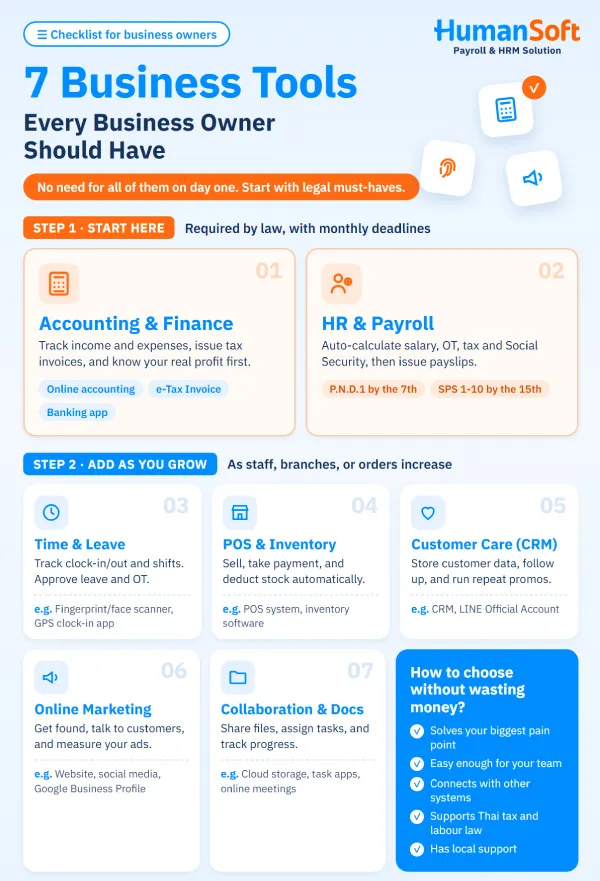
Grouped by the work an owner has to look after, there are 7 types. Here's a quick summary, followed by a closer look at each one.
|
Tool type |
What it helps with |
Examples |
|
1. Accounting and finance |
Recording income and expenses, issuing tax invoices, tracking profit and loss |
Online accounting software, e-Tax Invoice system, banking app |
|
2. HR and payroll |
Calculating salary, OT, tax, and Social Security, and issuing payslips |
Payroll software, online HR system |
|
3. Time and leave |
Recording clock-in and clock-out, scheduling shifts, approving leave and OT |
Fingerprint or face scanner, GPS clock-in app |
|
4. POS and inventory |
Selling, taking payment, updating stock automatically |
POS system, inventory software |
|
5. Customer care (CRM) |
Storing customer data, following up on sales, running repeat promotions |
CRM system, LINE Official Account |
|
6. Online marketing |
Getting found, talking to customers, measuring ad results |
Website, Google Business Profile, social media |
|
7. Collaboration and documents |
Sharing files, assigning tasks, tracking progress |
Cloud storage, task management app, online meetings |
1. Accounting and finance tools
This is the first tool to get, because every decision an owner makes starts with the numbers. At the very least, you should know how much came in, how much went out, and what's left each month. If you're not ready for software yet, start with a simple income and expense template and keep it up to date.
As the business grows, online accounting software lets you issue tax invoices, receipts, and tax reports in one place. It also helps you avoid a common SME mistake: mixing personal money with business money.
2. HR and payroll tools
The moment you hire your first employee, you're responsible for their salary, withholding tax, and Social Security contributions. These all have monthly deadlines and penalties if you miss them, so they're well worth automating.
Good payroll software calculates OT, tax, and Social Security for you, sends online payslips, and produces the P.N.D.1 and SPS 1-10 reports as soon as you close the pay period. If you also run a provident fund, check that the software supports PVD and EWF calculations too.
3. Time and leave tools
Payroll can only be right if the time data is right. Shops with several shifts, or teams that work off-site, should use an online time attendance system that feeds hours straight into payroll, with no re-typing. Options range from face-scan and GPS clock-in to clocking in and requesting leave through LINE. Managers approve requests on their phone, which cuts down on mistakes when counting sick, personal, and annual leave.
4. POS and inventory systems
A must for shops, restaurants, and retail. A POS system records every sale, updates stock automatically, and shows which products sell best at which times. Owners with several branches can see sales from every location on their phone in real time.
5. Customer care tools (CRM)
CRM (Customer Relationship Management) is a system that keeps customer details and purchase history so your sales team can follow up consistently. A small business can start with a LINE Official Account, which lets you tag customer groups and send targeted messages, then move to a full CRM once you have several salespeople.
6. Online marketing tools
The basics are a Google Business Profile so customers can find you on the map, a social media page to stay in touch, and a website with your products and contact details. After that, add a tracking tool such as Google Analytics to see where customers come from, so your ad budget goes to the right channels.
7. Collaboration and document tools
Keep files in the cloud instead of on one person's computer, assign work in a task app instead of in chat, and write key processes down as an SOP that everyone can open. That way, work doesn't grind to a halt when someone is on leave or resigns.
Which business tools should you start with at each stage?
Start with the work that's required by law and the work that takes up most of your time, then add tools as your headcount and operations grow. Use this table as a guide.
|
Business size |
Get these first |
Add when you're ready |
|
Solo owner / freelancer |
Income and expense records, banking app, social media |
Receipt and tax invoice software |
|
1–10 employees |
Accounting software, payroll software, time attendance |
POS, LINE OA |
|
10–50 employees |
All-in-one online HR system (payroll + time + leave), POS and inventory |
CRM, task management app |
|
50+ employees / multiple branches |
Systems that connect data across branches, performance evaluation |
Management dashboard |
Running several branches? See how to set it up in choosing HR software for multi-branch retail.
How do you choose business tools without wasting money?
Choose based on the problems you actually have, not on the longest feature list. Before you decide, run through these 5 checks:
- Does it fix your biggest pain point? Write down which task wastes the most time or goes wrong most often, then check whether the tool really solves it.
- Is it easy enough for your team to use? Ask for a free trial and have the people who'll use it every day try it too.
- Does it connect with your other systems? For example, can time attendance data flow into payroll, and can payroll export a file for your accountant?
- Does it support Thai law? Some overseas tools don't handle Thai personal income tax, Social Security, or the report formats Thai government agencies require.
- Is there local support? When you're closing payroll or filing tax, a fast answer is worth more than a slightly lower price.
Don't forget data security. Employee and customer data are protected under Thailand's Personal Data Protection Act B.E. 2562 (2019), or PDPA. See what you need to prepare in what HR needs to know about PDPA.
Which tasks are required by law and need a system behind them?
Most tasks with deadlines and penalties sit on the accounting, tax, and payroll side. That's why these tools should come first.
|
Duty |
Deadline |
Relevant law |
|
File P.N.D.1 and remit withholding tax on salaries |
By the 7th of the following month (8 extra days if filed online) |
Revenue Code |
|
Remit Social Security contributions (SPS 1-10) |
By the 15th of the following month |
Social Security Act B.E. 2533 (1990) |
|
Keep an employee register and wage payment records |
Employers with 10 or more employees; keep for at least 2 years |
Labour Protection Act B.E. 2541 (1998) |
|
Protect employee and customer personal data |
For as long as you hold the data |
Personal Data Protection Act B.E. 2562 (2019) |
Overtime is another area where manual calculation often goes wrong. See the rates and formulas in how to calculate OT under Thai labour law.
HumanSoft's all-in-one online HR system brings payroll, time attendance, leave, and tax and Social Security reports together in one place. Work hours flow into payroll automatically, and once you close the pay period you have employee payslips, P.N.D.1, and SPS 1-10 ready to file. Owners can see labour costs across every branch from a single screen.
Summary: the business tools every owner should have
There are many kinds of business tools, but you don't need all of them on day one. Start with accounting and payroll, since both are required by law and have monthly deadlines. Then add time attendance, POS, CRM, and marketing tools as your business grows. Pick tools that solve real problems, are easy to use, connect with each other, and support Thai law. That alone can save an owner hours every month.
Want to try an HR and payroll system before you decide? Start a free HumanSoft trial or see our packages and pricing.
FAQ: Common questions about business tools
Q: What is the first business tool an SME should have?
A: Start with accounting and finance tools, because an owner needs to know real income, expenses, and profit before making other decisions. Once you hire staff, add payroll software next, since tax and Social Security have to be filed every month.
Q: Can a small business use Excel instead of software?
A: Yes, while you have only a few employees and a low volume of transactions. Once you have shifts, several OT rates, or more than one branch, Excel becomes error-prone and won't remind you of deadlines. That's usually the point where switching to software pays off.
Q: Are cloud-based business tools better than installed software?
A: Cloud tools work from anywhere with an internet connection, need no server investment, and the provider handles updates and backups. They suit owners who want to check data on their phone or run several branches. Installed software suits organisations that need to keep all data in-house.
Q: What should business owners look for in payroll software?
A: Check that it automatically calculates personal income tax, Social Security, and OT under Thai law, produces P.N.D.1 and SPS 1-10 reports, connects with time attendance, offers online payslips, and comes with local support.
Q: My data is scattered across too many tools. How do I fix that?
A: Choose tools that bring related work into one system, such as an HR system that combines payroll, time attendance, and leave, or tools that can export and sync data with your other systems. This cuts down on re-typing and reduces errors.
Related reading
