
How to Notify Social Security When an Employee Resigns
When an employee resigns or ceases to be insured, the employer must report the termination of insured status using Form SSO 6-09 by the 15th of the following month. The notification can be submitted at a Social Security Office or through the e-Service system.
Table of Contents:
- How to Notify Social Security When an Employee Resigns
- Why Is Reporting the Termination of Social Security Coverage Important?
- When Must an Employer Report an Employee’s Termination of Social Security Coverage?
- How Employers Can Report Termination of Social Security Coverage
- Comparing Social Security Termination Reporting Channels: Office and e-Service
- Important Considerations When Reporting Termination
- Summary: How to Report Social Security Termination When an Employee Resigns
- Frequently Asked Questions About Reporting Social Security Termination
Why Is Reporting the Termination of Social Security Coverage Important?
Reporting the termination of social security coverage, or the end of insured status, is an important employer obligation when an employee insured under Section 33 leaves employment, as required by the Social Security Act B.E. 2533 (1990). This helps prevent errors and confusion in Social Security Office operations. Delayed registration or termination reports by employers can leave the database outdated, delay benefits for insured persons, and potentially cause the Social Security Office to overpay medical service fees to healthcare facilities.
To prevent these problems, the Social Security Act B.E. 2533 (1990) stipulates that employers who intentionally evade, delay, or fail to comply may face legal action, including imprisonment for up to six months, a fine of up to THB 20,,000, or both imprisonment and a fine.
When Must an Employer Report an Employee’s Termination of Social Security Coverage?
The Social Security Act B.E. 2533 (1990) requires employers to report the termination of social security coverage when an employee resigns or leaves employment for any other reason. The employer must submit the Notification of Termination of Insured Status (Form SSO 6-09), state the reason for leaving, and complete the process no later than the 15th of the following month.
How Employers Can Report Termination of Social Security Coverage
Employers can report the termination of social security coverage, or the end of insured status, through two channels: at a Social Security Office or through the e-Service system, as follows:
Steps for Reporting at a Social Security Office
To report the termination at a Social Security Office, follow these steps:
1. Visit the website www.sso.go.th
2. Register and print Form SSO 6-09
3. Submit it to the responsible Bangkok, provincial, or branch Social Security Office
4. An officer will approve the employer’s USER PASSWORD and send confirmation by email
Steps for Reporting Through the e-Service System
To report the termination through the e-Service system, follow these steps:
1. Visit the website www.sso.go.th and select “Establishment”
2. Click “Insured Person Registration.” The insured person registration page will appear.
3. Select “Notification of Termination of Insured Status (SSO 6-09)” and choose the establishment for which you want to process the registration.
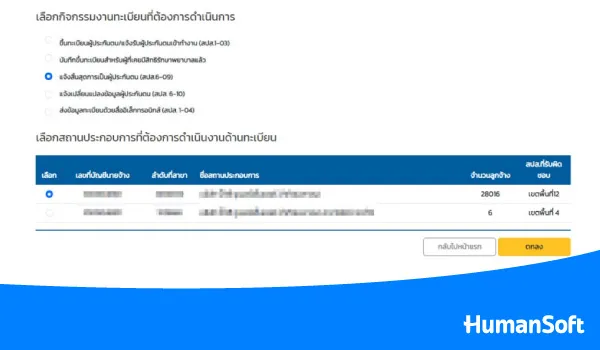
4. Click “OK.” The data entry page will appear.
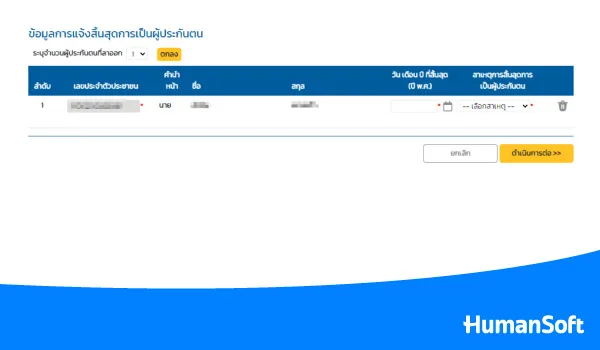
5. Enter the national ID number of the insured person. The system will display the insured person’s first and last name.
6. Select the date and reason for termination of insured status, then click “Continue.” The review page will appear.
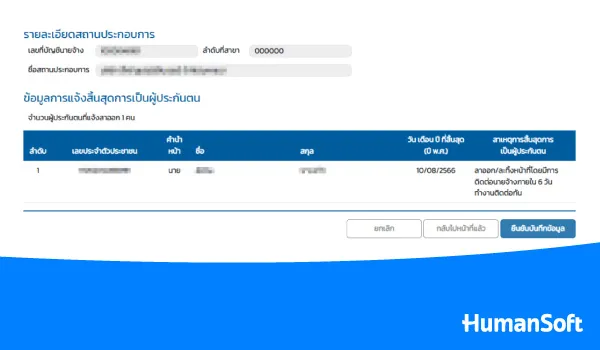
7. Review the information for accuracy. To make changes, click “Back to Previous Page” and edit the information.
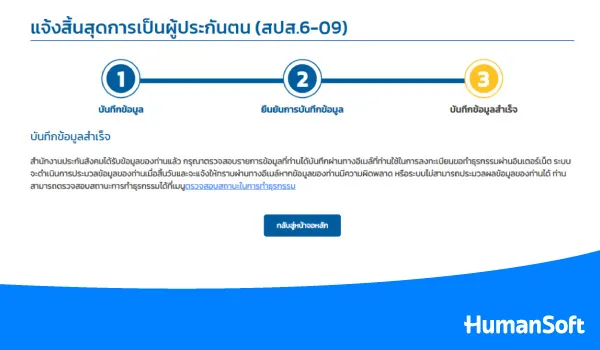
8. Once the information is correct, click “Continue.” The system will display a confirmation page and send an email acknowledging receipt of the insured person’s termination information under Form SSO 6-09.
Tips! Read More Related Articles >> How Employers Can Register Employees for Social Security Online
Comparing Social Security Termination Reporting Channels: Office and e-Service
| Topic | Social Security Office | e-Service |
| Process | Submit to an officer | Complete the process online |
| Location | Responsible Social Security Office | Online system |
| Required Form | SSO 6-09 | SSO 6-09 |
| Data Verification | Review before submission | Review before confirmation |
*Information as of September 2026
Important Considerations When Reporting Termination
When reporting termination of social security coverage, employers must provide accurate facts about why the insured status ended. The Social Security Act B.E. 2533 (1990) specifies seven reasons for termination:
- Resignation / absence from duty while contacting the employer within six consecutive working days
- End of employment contract
- Termination / early retirement program
- Retirement
- Dismissal / removal / termination for misconduct / absence from duty without contacting the employer for seven consecutive working days
- Death
- Branch transfer
Employers should be aware that providing false information, such as falsely reporting a resignation, may be an offense punishable by imprisonment for up to six months, a fine of up to THB 20,000, or both.
Summary: How to Report Social Security Termination When an Employee Resigns
When an employee insured under Section 33 leaves employment, the employer must report the termination to the Social Security Office by the 15th of the following month. The report can be submitted at a Social Security Office or through the e-Service system. Employers who intentionally evade, delay, or falsely report the reason for termination may face legal action. Employers should therefore pay close attention to procedures related to employees’ social security rights to protect the benefits legally available to insured persons.
Frequently Asked Questions About Reporting Social Security Termination
Q : Can a company report multiple employee resignations at the same time?
A : The reports can be processed through the channels and methods specified by the Social Security Office. HR should verify each employee’s information before confirmation.
Q : What documents should HR retain after reporting the termination?
A : HR should retain employment termination documents and evidence of the completed process according to company policy for future verification.
Q : How can an employer confirm that the termination report was successful?
A : The status can be checked through channels specified by the Social Security Office, and proof of submission should be retained.
Read More Related Articles
- How Employers Can Register Employees for Social Security Online
- Social Security Benefits You Should Know: Sections 33, 39, and 40
- Which Annual Health Checkups Are Covered by Social Security?
- 10 Benefits That “Employees” Value Most
- How to Change Your Social Security Hospital Through SSO Connect
- A Complete Guide to Social Security Fund and Workmen’s Compensation Fund Benefits



