
How to Change Your Social Security Hospital Easily via SSO Plus
Insured persons under Section 33 and Section 39 can change their social security hospital once a year, between 16 December and 31 March of the following year. You can do it yourself online through 4 channels: the SSO+ app, the www.sso.go.th website, LINE @ssothai and the Tang Rat app, with no documents required. Since 2 April 2026, logging in to the Social Security Office's e-Self Service requires identity verification through the ThaiD app instead of the old username and password.
Table of Contents:
- How to Change Your Social Security Hospital Easily via SSO Plus
- When Can You Change Your Social Security Hospital?
- What Do You Need Before Changing Hospitals?
- How to Change Your Social Security Hospital in the SSO Plus App
- Other Ways to Change Your Social Security Hospital
- What Documents Do You Need to Change Your Social Security Hospital?
- How Long Does a Social Security Hospital Change Take?
- How Can HR Help Employees Change Hospitals?
- Summary: Changing Your Social Security Hospital
- FAQ: Common Questions About Changing Your Social Security Hospital
When Can You Change Your Social Security Hospital?
Changing your social security hospital means moving your medical entitlement from your current social security hospital to a new one. It is available to insured persons under Section 33 and Section 39, in 2 cases:
|
Case |
When to apply |
Conditions |
|
1. Annual change |
16 December – 31 March of the following year |
Once a year, no reason required |
|
2. Mid-year change |
Within 30 days of moving home or changing workplace |
A valid reason, such as moving home, changing workplace, or having a hospital assigned that you did not choose to use |
The hospital you choose must be in the province where you work or live, or a neighbouring province. Each hospital accepts a limited number of insured persons, and you cannot select a hospital once it is full, so apply early in the round.
What Do You Need Before Changing Hospitals?
Since 2 April 2026, the Social Security Office has required everyone to log in to e-Self Service by verifying their identity through the ThaiD app only. Usernames and passwords created before that date no longer work. Before changing your hospital online, prepare the following:
- Install the ThaiD app and verify your identity: Register in the app with your physical Thai ID card. If you cannot verify your identity yourself, take your ID card to your district office (amphoe or khet office).
- Install the SSO+ (SSO Plus) app: Available on both iOS and Android. This app replaces the old SSO Connect app.
- Shortlist 1–3 hospitals: In case your first choice has reached its quota.
How to Change Your Social Security Hospital in the SSO Plus App
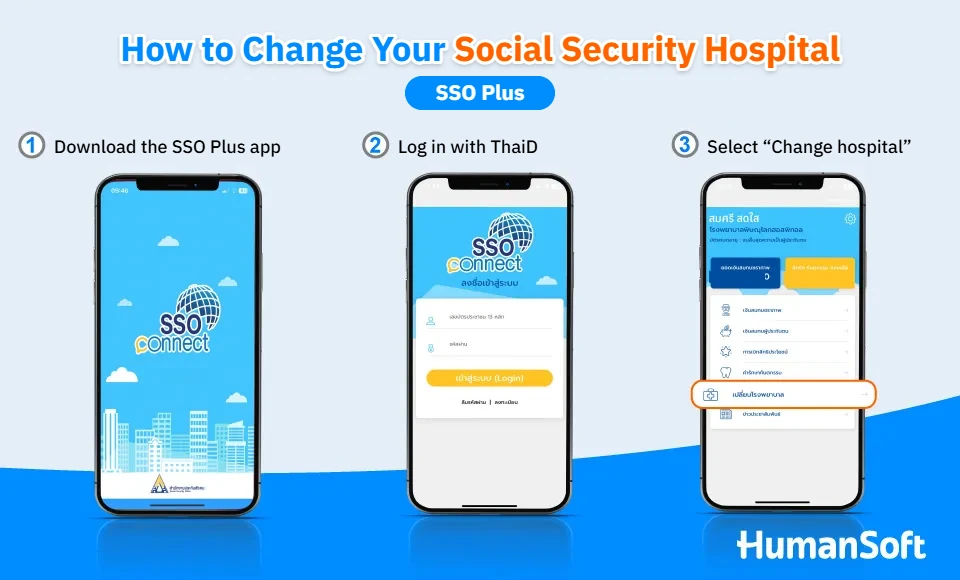
- Open the SSO+ app: Download the Social Security Office's SSO Plus app.
- Log in with ThaiD: The app takes you to the ThaiD app to verify your identity, then returns you to SSO Plus automatically.
- Select the "Change hospital" menu
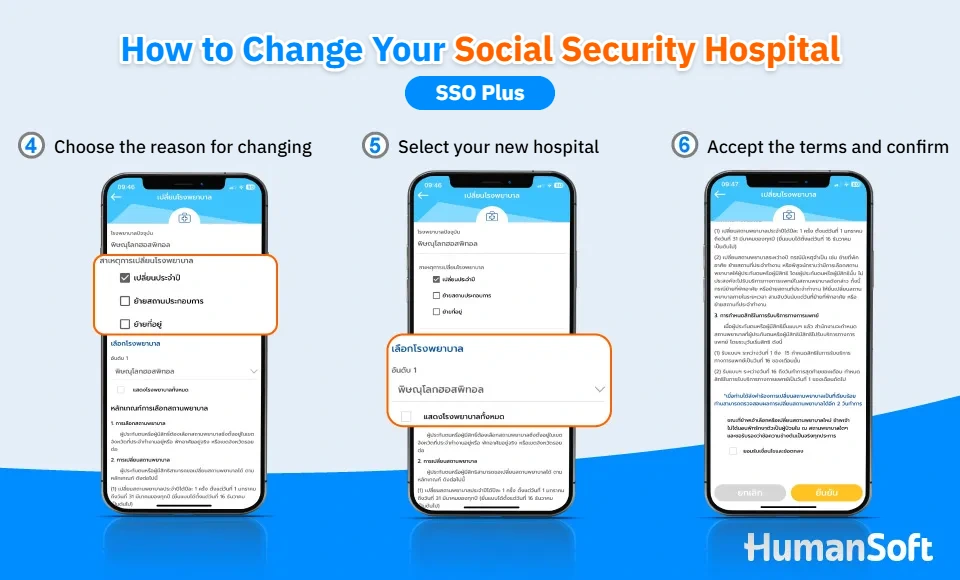
- Choose the reason for the change: Annual change, change of workplace, or change of address.
- Select the social security hospital you want
- Accept the terms and confirm: You can check the result within 2 working days.
To check what your social security covers, read >>How to Check Social Security Benefits Online
Other Ways to Change Your Social Security Hospital
Besides the SSO Plus app, you can change your social security hospital through several other channels:
|
Channel |
Identity verification |
Documents |
|
SSO+ app |
ThaiD |
None |
|
www.sso.go.th website |
ThaiD (e-Self Service) |
None |
|
LINE OA @ssothai |
OTP code sent to your mobile phone |
None |
|
Tang Rat app |
Tang Rat account |
None |
|
Local Social Security Office |
Thai ID card |
Copy of ID card + Form SSO. 9-02 |
What Documents Do You Need to Change Your Social Security Hospital?
If you change online, you do not need any documents; just submit the request online. If you change at a Social Security Office, you need a copy of your ID card and Form SSO. 9-02. If you have already applied online, you do not need to submit documents again at the office.
How Long Does a Social Security Hospital Change Take?
After you submit your request, you can check the result within 2 working days. The date you can start using the new hospital depends on when you applied:
|
Applied between |
Coverage starts |
Example |
|
1st–15th of the month |
16th of the same month |
Applied 10 Feb 2027 → covered from 16 Feb 2027 |
|
16th – end of the month |
1st of the following month |
Applied 20 Dec 2026 → covered from 1 Jan 2027 |
While you wait, keep using your current hospital.
How Can HR Help Employees Change Hospitals?
The annual hospital change is each insured person's own right. HR cannot submit it online on an employee's behalf, because the employee must verify their identity with their own ThaiD. HR can still help in these ways:
- Remind employees before the round opens: Announce in mid-December that hospital changes are open, and share these steps.
- Advise on ThaiD: Employees who have never verified their identity should register in the ThaiD app in advance.
- New employees: They choose a hospital when the employer registers them as insured persons.
Summary: Changing Your Social Security Hospital
Insured persons under Sections 33 and 39 can change their social security hospital once a year between 16 December and 31 March, or mid-year after moving home or changing workplace. You can do it yourself through the SSO Plus app, the Social Security Office website, LINE @ssothai or the Tang Rat app, but have the ThaiD app ready first. Check the latest announcements on the Social Security Office website or call the 1506 hotline before you apply.
FAQ: Common Questions About Changing Your Social Security Hospital
Q: When can I change my social security hospital?
A: The annual change is allowed once a year, between 16 December and 31 March of the following year. If you move home or change workplace, you can change mid-year within 30 days of the move.
Q: Can I still log in to social security with my old username and password?
A: No. Since 2 April 2026, logging in to e-Self Service requires identity verification through the ThaiD app only. If you cannot verify your identity in ThaiD yourself, take your ID card to your district office.
Q: Can I still use the SSO Connect app to change hospitals?
A: The Social Security Office now uses the SSO+ (SSO Plus) app as its main app in place of SSO Connect. Download SSO+ and log in with ThaiD to change your hospital.
Q: When can I start using the new hospital?
A: If you apply between the 1st and 15th of the month, you can use the new hospital from the 16th of the same month. If you apply between the 16th and the end of the month, coverage starts on the 1st of the following month.
Q: Can Section 40 insured persons change their social security hospital?
A: Choosing and changing a social security hospital applies only to insured persons under Section 33 and Section 39. Section 40 insured persons do not choose a social security hospital.
Q: Can HR change the social security hospital on an employee's behalf?
A: Not through the online channels, because employees must verify their identity with their own ThaiD. HR can help by reminding employees when the round opens and sharing the steps with them.
Related articles



