

How to Check Social Security Benefits Online Using Your National ID Number
Insured persons can check their Social Security benefits online by themselves through 2 channels: the Social Security Office website www.sso.go.th and the SSO Plus application. Insured persons cancheck which benefits they are entitled to, how much they have contributed, and which hospital they can use for medical treatment under Social Security. There is no need to visit a Social Security Office, and the service is free of charge.
Table of Contents:
- How to Check Social Security Benefits Online Using Your National ID Number
- What Social Security Benefits Are Available?
- Where Can You Check Social Security Benefits Online?
- Steps to Check Social Security Benefits Online via the Website Using ThaiD
- Steps to Check Social Security Benefits Online via the Application
- Summary: How to Check Social Security Benefits Online Using Your National ID Number
- FAQ: Frequently Asked Questions About Checking Social Security Benefits
What Social Security Benefits Are Available?
Insured persons whopay Social Security contributionsevery month are covered in 7 cases as follows:
| Benefit | What Does It Cover? |
| Sickness | Medical treatment and compensation subject to applicable conditions |
| Childbirth | Childbirth expenses and related benefits |
| Child Allowance | Allowance to help cover child-rearing expenses |
| Unemployment | Unemployment compensation subject to applicable conditions |
| Disability | Compensation in case of loss of working capacity |
| Death | Funeral expenses and compensation subject to applicable conditions |
| Old Age | Old-age lump-sum payment or pension subject to applicable conditions |
*Information as of September
Where Can You Check Social Security Benefits Online?
You can check through 2 channels, both using your national ID number as the username.
- Via the website Social Security Office www.sso.go.th
- Via the application SSO+ on mobile devices
Both channels provide access to the same information but differ in convenience. The website is suitable for submitting requests and attaching documents, while the application is convenient for quickly checking information during the day.
Steps to Check Social Security Benefits Online via the Website Using ThaiD
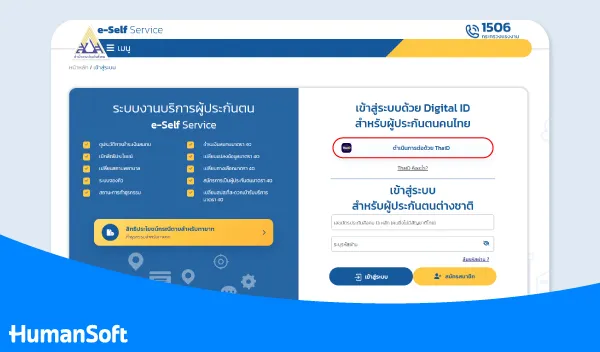
1. Register or Log In to the Social Security Office System
Go to the Social Security Office e-Self Service system Then go to the service page for insured persons. On the login page, select “Continue with ThaiD” The system will proceed to identity verification through the ThaiD application.
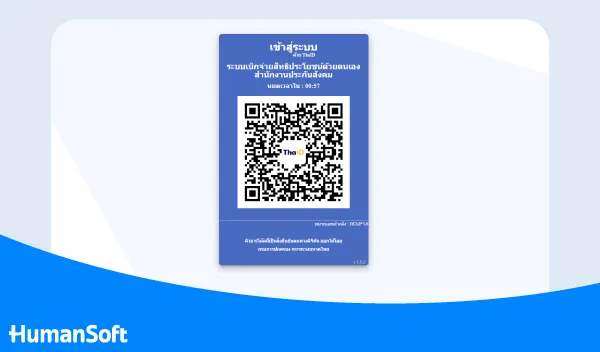
2. Verify Your Identity via the Thai App
Open the ThaiD application on your mobile phone and follow the on-screen identity verification steps. The system will display a QR Code for you to scan with the ThaiD application and complete the verification process.
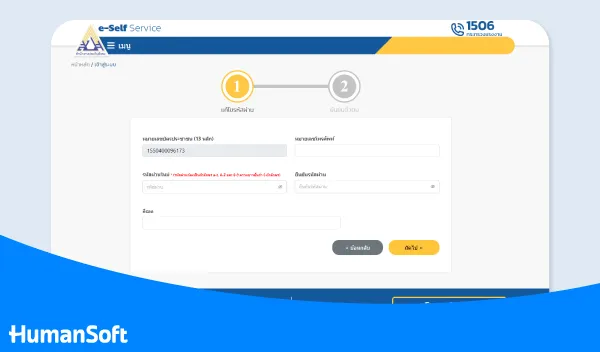
3. Change the Password
If the e-Self Service system displays a screen asking you to set or change your password, create a new password and enter it again for confirmation. Then verify your identity with an OTP to complete the password change.
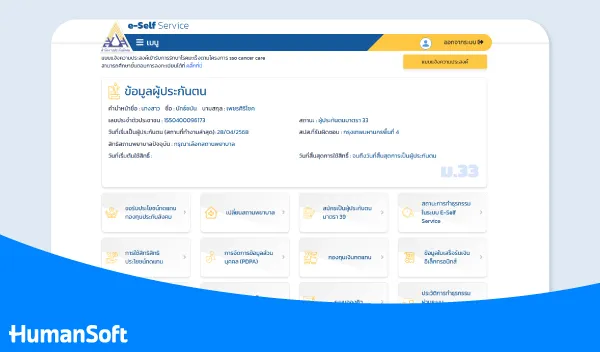
4. Check Insured Person Information and Benefits
Once identity verification is successful, the system will return you to e-Self Service and display insured person information such as personal details, benefits, and service menus relevant to the applicable insured-person section.
Learn more at >>> Check Social Security Benefits Without Having to Remember a Password
Steps to Check Social Security Benefits Online via the Application
You can do this anywhere and anytime by following these simple steps:
Step 1 Download the Application
Download the Application SSO Plus which supports both Android and iOS and complete the installation.
Step 2 Register or Log In
After installation, register if you are not yet a member. Existing members can enter their national ID number and password to log in.
Step 3 Check Your Benefits in the Application
After logging in, you will see insured person information such as your full name, the hospital where you can use Social Security medical benefits, your old-age contribution balance, and Social Security dental benefits. Select the desired menu to view the details immediately.
Learn more at >>> SSO Plus: Check Benefits and Social Security Information in One App
Summary: How to Check Social Security Benefits Online Using Your National ID Number
Currently, checking Social Security benefits online through e-Self Service requires identity verification with ThaiD for users under the new process. The previous method of entering a username and password should no longer be used as the primary method.
FAQ: Frequently Asked Questions About Checking Social Security Benefits
Q: What should I do if I forget the password for sso.go.th ?
A: Click the “Forgot Password” link on the login page, then verify your identity using your national ID number and the phone number previously registered to receive an OTP If the linked phone number has changed, you must contact the Social Security Office to update your information first.
Q: Do insured persons under Sections 33, 39 and 40 check their benefits in the same way?
A: All of them use the same channels: the website sso.go.th and the application. However, the benefits shown in the system differ depending on the insured-person section because each section provides different coverage.
Q: After resigning from a job, can I still check and use my Social Security benefits?
A: You can still log in to view your contribution history and current status. Medical benefits remain available for a certain period after employment ends. If you want to continue being insured, you can apply under Section 39 within the timeframe specified by the Social Security Office.
Q: Can I change my Social Security hospital online?
A: Yes. Use the “Request to Change Healthcare Facility” menu in the system. The hospital can generally be changed once a year and only during the period designated by the Social Security Office. Outside that period, changes are allowed only when necessary, such as moving residence or changing workplaces.
Q: If I do not have a smartphone or cannot access the website, is there another way to check my benefits?
A: Contact the Social Security hotline at 1506 or visit a Bangkok Area Social Security Office or a Provincial Social Security Office with your national ID card so that an officer can check your benefits.
Read More Related Articles
- After Resigning, How Long Do Social Security Benefits Continue and Do You Need to Apply Under Section 39?
- Social Security Dental Benefits Update 2026: Is It Free and What Is Covered?
- Royal Gazette Announces New Social Security Contribution Ceiling Effective January 1, 2026
- SSO Plus: Check Benefits and Social Security Information in One App



