
Can Hourly Part-Time and Full-Time Employees Use the Same HR Software?
Yes. Hourly part-time employees can use the same HR and payroll software as full-time employees, because under Thai labour law part-timers are “employees” too. The only differences are how their wages are calculated and a few entitlements: for example, they are not paid for weekly holidays, and they receive 2× pay when working on a holiday. Suitable software must support hourly pay rates, pull actual hours from the time attendance system, and calculate OT, Social Security and tax for every employee type in the same payroll run.
Table of Contents:
- Can Hourly Part-Time and Full-Time Employees Use the Same HR Software?
- How Do Hourly Part-Time Employees Differ from Full-Time Employees?
- What Are the Risks of Calculating Part-Time Pay Separately in Excel?
- What Must HR Software Do to Handle Hourly Part-Time Pay?
- Example: One Month of Pay for an Hourly Part-Time Employee
- How Do You Calculate the Hourly Minimum Wage for Part-Time Staff?
- How Does HumanSoft Handle Part-Time and Full-Time Payroll in One System?
- FAQ: Common Questions About Part-Time Employees
How Do Hourly Part-Time Employees Differ from Full-Time Employees?
Part-time employees work fewer hours than the normal working schedule and are usually paid for the hours they actually work. They are protected under the Labour Protection Act B.E. 2541 (1998), just like full-time employees. Here is where payroll software needs to calculate them differently:
|
Item |
Hourly part-time |
Monthly full-time |
|
How pay is calculated |
Hourly rate × actual hours worked |
Fixed salary, less absence, unpaid leave and lateness |
|
Pay for weekly holidays |
Not paid (Section 56) |
Paid (already included in the salary) |
|
Pay for public holidays and annual leave |
Paid (Section 56) |
Paid |
|
Working on a holiday (normal hours) |
At least 2× (Section 62) |
At least 1× extra (Section 62) |
|
OT on working days |
At least 1.5× the hourly wage, the same for both (Section 61) |
|
|
Paid sick leave |
Up to 30 working days per year, the same for both (Section 57) |
|
|
Social Security |
Both register as insured persons under Section 33; 5% of that month’s actual wages is deducted |
|
|
Withholding tax |
Both are income under Section 40(1) of the Revenue Code |
|
As you can see, the core rules are almost identical. Only the wage basis and holiday entitlements differ, so a single payroll system can handle both groups, as long as employee types are set up correctly.
What Are the Risks of Calculating Part-Time Pay Separately in Excel?
Many companies run full-time employees through payroll software but still calculate part-time pay separately in Excel, which leaves two data sets to merge every month. The most common errors are:
- Hours don’t match actual clock-in/out times: hours keyed in by hand from timesheets are easily missed or double-counted.
- Holiday pay rules applied wrongly: paying part-timers for weekly holidays, or forgetting the 2× rate when they work on a holiday.
- Social Security not deducted or remitted: part-timers must be registered and contribute just like full-time employees.
- Pay falling below the minimum wage unnoticed: the hourly rate must not be lower than the provincial minimum wage converted to an hourly rate.
- Incomplete government filings: part-time totals have to be added to the PND 1 and SSO 1-10 forms by hand every month.
What Must HR Software Do to Handle Hourly Part-Time Pay?
Before choosing HR software, check that it can do all six of these:
- Hourly pay rates: separate hourly, daily and monthly employee types in one system.
- Hours pulled automatically from time attendance: no manual keying of working hours.
- Flexible shift scheduling: part-timers often work part days or only during peak hours.
- OT and holiday pay by employee type: 2× for hourly staff and 1× extra for monthly staff when working on a holiday.
- Automatic Social Security and tax deductions: calculated from that month’s actual wages.
- Payslips and reports for all employee types: file PND 1 and SSO 1-10 from a single data set.
Example: One Month of Pay for an Hourly Part-Time Employee
A part-time employee earns 60 baht/hour. This month they worked 4 hours a day for 20 days, did 6 hours of OT on working days, and worked 4 hours on a weekly holiday (hypothetical example).
|
Item |
Calculation |
Baht |
|
Regular hours pay |
4 hrs × 20 days × 60 |
4,800.00 |
|
Workday OT (1.5×) |
6 hrs × 60 × 1.5 |
540.00 |
|
Holiday work (2×) |
4 hrs × 60 × 2 |
480.00 |
|
Total earnings |
4,800 + 540 + 480 |
5,820.00 |
|
Social Security deduction 5% |
5,820 × 5% |
−291.00 |
|
Net pay |
5,820 − 291 |
5,529.00 |
At this level, annual income is below the income tax threshold, so no withholding tax applies in this example. Calculating by hand, HR has to split hours into three types and apply different multipliers, while payroll software separates them automatically from the time attendance data and shift settings. Learn more: >> A simple guide to calculating hourly pay and How to calculate daily and monthly OT
How Do You Calculate the Hourly Minimum Wage for Part-Time Staff?
A part-timer’s hourly wage must not be lower than the province’s daily minimum wage divided by 8 hours. Under the current rates (Wage Committee Notification No. 14, effective 1 July 2025 / B.E. 2568), it works out as follows:
- Province with a 400 baht/day minimum wage: 400 ÷ 8 = 50 baht/hour
- Province with a 337 baht/day minimum wage: 337 ÷ 8 = 42.13 baht/hour
Minimum wages can be revised every year and vary by province, so check the latest rate for the province where the employee works with the Ministry of Labour before setting rates in the system.
How Does HumanSoft Handle Part-Time and Full-Time Payroll in One System?
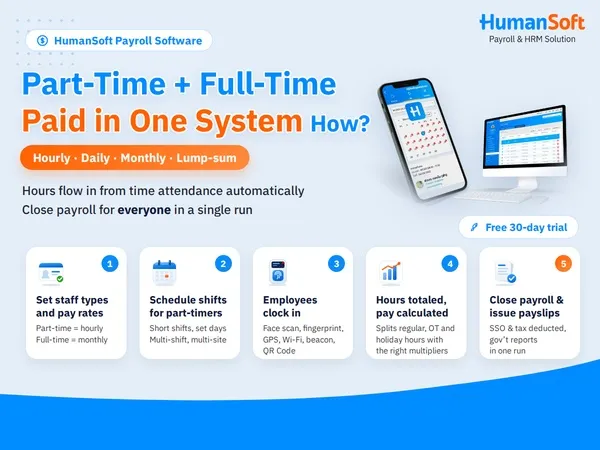
HumanSoft payroll software supports hourly, daily, monthly, part-time and lump-sum pay in a single system, pulling hours from the time attendance system and calculating pay automatically. Here’s how it works:
- Set employee types and pay rates: set part-time employees as hourly with an hourly rate, and full-time employees as monthly.
- Schedule shifts: create short or day-specific shifts for part-timers, with support for multiple shifts and locations.
- Employees clock in themselves: via face scan, fingerprint, GPS, Wi-Fi, beacon or QR Code, or a supervisor can clock in team members by face scan.
- The system totals hours and calculates pay: regular, OT and holiday hours are separated and the right multipliers applied for each employee type.
- Close payroll and issue payslips: Social Security and tax are deducted automatically, and payslips for every employee type are issued together with government reports in one run.
See details on HumanSoft payroll software pricing or start a free 30-day trial
FAQ: Common Questions About Part-Time Employees
Q: Do part-time employees need to be registered for Social Security?
A: Yes. Part-time employees must be registered as insured persons under Section 33 within 30 days of their start date. Contributions are 5% of that month’s actual wages, with a minimum wage base of 1,650 baht and a maximum of 17,500 baht.
Q: Do hourly part-time employees get holiday pay?
A: They are not paid for weekly holidays, but they are paid for public holidays and annual leave under Section 56 of the Labour Protection Act. If they work on a holiday, they must receive at least 2× their hourly wage.
Q: Is withholding tax deducted from part-time pay?
A: Part-time wages are income under Section 40(1) of the Revenue Code, the same as full-time salaries. Employers must calculate withholding tax based on annual income. If annual income after expenses and allowances is below the tax threshold, nothing needs to be withheld, but the amounts must still be reported in the PND 1 Kor annual return.
Q: What is the hourly minimum wage for part-time staff?
A: Divide the province’s daily minimum wage by 8 hours. For example, a province with a 400 baht/day minimum wage gives 50 baht/hour, and one with 337 baht/day gives about 42.13 baht/hour.
Q: Can payroll software process part-time and full-time employees in the same payroll run?
A: Yes. If the software can set hourly and monthly employee types separately and pull hours automatically from the time attendance system, HR can close payroll, issue payslips and prepare PND 1 and SSO 1-10 reports for every employee type at once.
Related articles
