
What Are the Benefits of an HR System with Employee Self Service?
Employee Self Service (ESS) is a feature of an HR system that lets employees handle their own HR tasks through an app or website, such as requesting leave, submitting overtime (OT), checking their leave balance, viewing pay details and clocking in and out, without contacting HR every time. The main benefits are that employees get information instantly, managers can approve requests from their phones, and HR spends less time on paperwork and re-entering data.
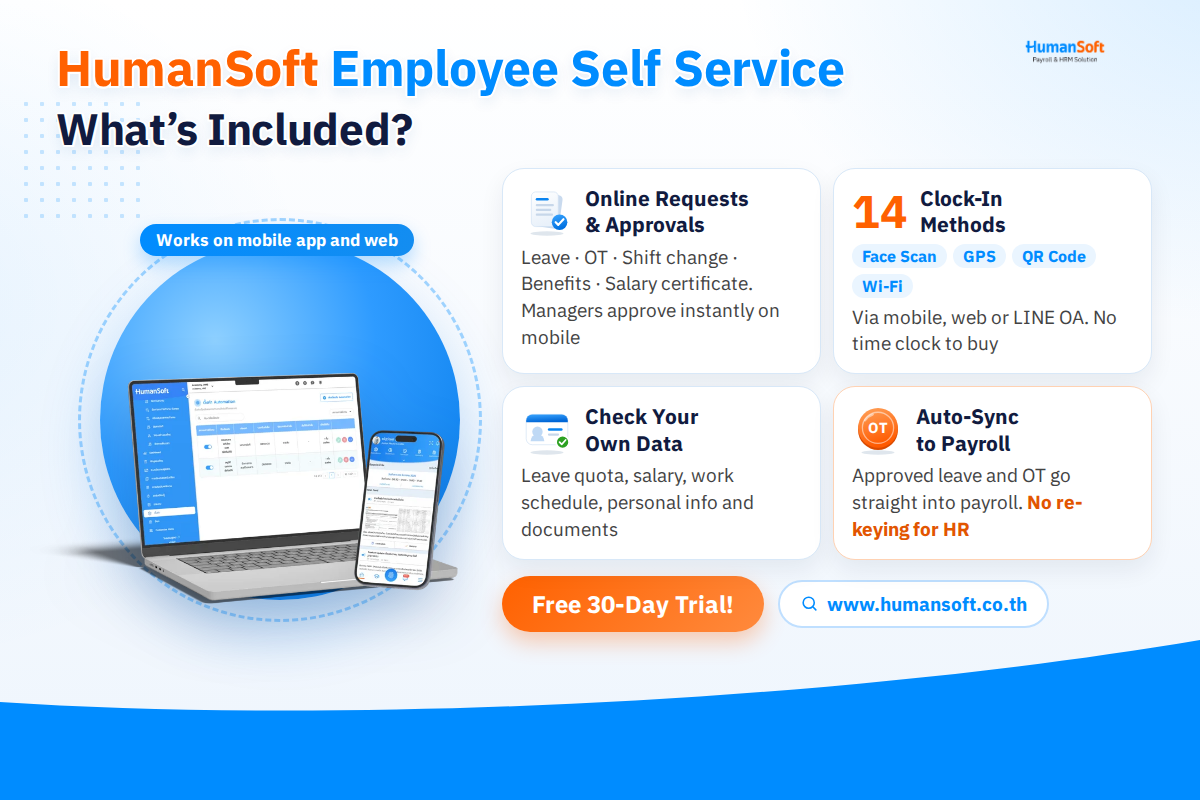
Table of Contents:
- What Are the Benefits of an HR System with Employee Self Service?
- What Is Employee Self Service (ESS)?
- What Can Employees Do with an ESS System?
- What Are the Benefits of an HR System with ESS?
- How Does HR Work Change Before and After ESS?
- What Should You Look for in an HR System with ESS?
- What Employee Self Service Features Does HumanSoft Offer?
- Summary: What Are the Benefits of an HR System with Employee Self Service?
- FAQ: Frequently Asked Questions about Employee Self Service
What Is Employee Self Service (ESS)?
Employee Self Service (ESS) is a system designed to let employees manage their own HR information and requests, without relying on the human resources (HR) department at every step. ESS is usually part of an HRMS, which brings employee records, working time and payroll together in one place.
In an HR system with ESS, each group has its own role:
- Employees: submit requests and check their own information
- Managers: approve or reject their team members' requests in the system
- HR: set policies, monitor the overall picture and use approved data to calculate payroll
What Can Employees Do with an ESS System?
An ESS system lets employees complete the HR tasks that concern them in one place. Common functions include:
|
Function |
What employees can do |
|
Personal information |
Check their personal and employment details |
|
Leave |
Request leave online and see their remaining leave balance instantly |
|
Overtime and shifts |
Request overtime, request shift changes and check their work schedule |
|
Clocking in and out |
Clock in via mobile or web, including when working off-site |
|
Pay |
View their pay details and payslips |
|
Documents and benefits |
Claim benefits, request a salary certificate and track approval status |
|
Learning |
Learn at their own pace through the organisation's e-learning system |
Tip! For more on clocking in, read Review of 6 Employee Time Attendance Systems
What Are the Benefits of an HR System with ESS?
An HR system with Employee Self Service lets employees manage their own information quickly and easily, while HR gains more time for people development. The main benefits fall into three areas:
1. More convenience for employees
Employees no longer need to fill in paper forms or wait for HR to reply, because they can handle requests themselves in the system.
- Manage their own information
- Submit documents and track their status in real time
- Request approvals easily, with managers approving instantly from their phones
- Learn at their own pace through e-learning
2. Employees can check their own information at any time
Information that employees often ask HR about can be viewed directly in the system, reducing repeat questions and misunderstandings.
- Remaining leave balance
- Personal information
- Pay details (see also: online payslips)
- Documents and their approval status
- Work schedules
3. Manage everything online, from anywhere
ESS moves time recording and document requests from paper to an online system, available through two main channels:
- Smartphone: employees working off-site or travelling can clock in and out and submit requests through a mobile app straight away
- Web browser: every function is available on the web, with no software to install on a computer
How Does HR Work Change Before and After ESS?
The clearest difference is that tasks HR used to receive, collect and key in by hand move into a system where employees and managers complete them themselves.
|
Task |
Before ESS |
After ESS |
|
Requesting leave |
Fill in a leave form, get the manager's signature, then pass it to HR |
Submit in the system; the manager approves from their phone |
|
Checking leave balance |
Ask HR and wait for them to check the file |
Employees check it themselves instantly |
|
Overtime |
HR collects OT forms and keys them into payroll |
Approved OT flows into the payroll system |
|
Recording working time |
Use a time clock, so staff must be at the office |
Clock in via mobile or web, including off-site |
|
Requesting a salary certificate |
Ask HR and wait for the document to be prepared |
Submit a request in the system and track its status |
With less routine work, HR has more time for higher-value tasks such as running training, planning employee development and keeping data accurate. Read more about the core duties of HR.
What Should You Look for in an HR System with ESS?
A good ESS system should be easy for employees to use and pass data on to HR without re-entry. Check these five points:
- Full mobile support: employees can request leave, submit overtime and clock in from their phones, without needing a computer
- Payroll integration: approved leave, overtime and working time flow automatically into payroll calculation
- Configurable approval workflows: set multi-level approvers to match the organisation's structure, with a full approval history
- Access control: employees see only their own information, and the system meets verifiable data security standards
- No installation required: use it straight away on the web or in an app, reducing the load on IT
What Employee Self Service Features Does HumanSoft Offer?
HumanSoft payroll software includes ESS that employees use through a mobile app and on the web, covering the HR tasks they need most often:
- Online document submission and approval: request leave, overtime, shift changes, benefit claims and salary certificates, with managers approving instantly from their phones
- 14 ways to clock in: including face scan, GPS, QR code and Wi-Fi, via mobile, web or LINE OA, with no need to buy a time clock
- Self-service information: leave balance, pay details, work schedule, personal information and documents
- Automatic payroll integration: approved leave and overtime are pulled into payroll calculation automatically, so HR does not need to collect leave forms or re-enter OT
See package details >> Payroll software pricing
Summary: What Are the Benefits of an HR System with Employee Self Service?
An HR system with Employee Self Service lets employees request leave, submit overtime, clock in and check their own information from anywhere. Managers approve faster, and HR no longer needs to collect documents or re-enter data, leaving more time for people development. Before choosing a system, check that it works fully on mobile, integrates automatically with payroll and controls access to data.
Try ESS with a free 30-day HumanSoft trial to see how easily your employees and HR team can use it before you decide.
FAQ: Frequently Asked Questions about Employee Self Service
Q: What is the difference between ESS and an HRMS?
A: An HRMS manages HR across the whole organisation, while ESS is the part of an HRMS that employees use themselves, for example to request leave, submit overtime and check their own information. Learn more in What Is HRIS?
Q: Do employees need to install software to use ESS?
A: No installation is needed on a computer. Employees can use it straight away in a web browser or a mobile app.
Q: Can employees see other people's salaries?
A: No. ESS permissions let employees see only their own information, while organisation-wide data is available only to HR or other authorised users.
Q: After leave or overtime is requested through ESS, does HR still have to enter it into payroll?
A: It depends on the system. If the ESS is integrated with payroll, as in HumanSoft, approved leave and overtime are pulled into payroll calculation automatically.
Q: Do small businesses need an ESS system?
A: Yes, especially companies where only one or two people handle HR. ESS cuts the work of collecting leave forms, answering leave-balance questions and re-entering data, giving those people more time for other work.
Related articles
