

How to Register for Unemployment via ThaiD
Section 33 insured persons who have paid contributions for at least 6 months within the 15 months before becoming unemployed can register for unemployment online at e-service.doe.go.th by logging in with the ThaiD app. Register within 30 days after leaving your job, then report online once a month. If you were laid off, you receive 60% of your wages for up to 180 days. If you resigned or your fixed-term contract ended, you receive 30% for up to 90 days.
Table of Contents:
- How to Register for Unemployment via ThaiD
- Who Is Eligible to Register for Unemployment Benefits Under Section 33?
- How Do You Log In to the Department of Employment e-Service with ThaiD?
- How Do You Register for Unemployment Online?
- What Information and Documents Do You Need to Register?
- How Much Will You Receive, and When Will You Get Paid?
- Summary: What Do You Need to Do to Register for Unemployment Online?
- FAQ: Frequently Asked Questions About Unemployment Registration
Who Is Eligible to Register for Unemployment Benefits Under Section 33?
To receive unemployment benefits, you must be a Section 33 insured person and meet all of the following requirements.
- You have paid Social Security contributions for at least 6 months within the 15 months before becoming unemployed.
- You have been unemployed for at least 8 days.
- You register as unemployed with the Department of Employment, ideally within 30 days from the date your employment ended. If you register later than 30 days, you still receive benefits, but they are counted from the date you register, not backdated to the date you left your job.
- You report online as scheduled, once a month.
- You are ready to accept suitable work and do not refuse jobs or training arranged by the Department of Employment.
- You are not entitled to old-age benefits.
- You were not dismissed for dishonesty, intentionally causing damage to the employer, a serious violation of workplace rules, abandoning your duties for 7 consecutive days without reasonable cause, gross negligence causing serious damage to the employer, or imprisonment under a court judgment.
Note: If you resign and then register as a Section 39 insured person, you can still claim unemployment benefits under your previous Section 33 coverage, provided you register within 30 days from the date your employment ended.
How Do You Log In to the Department of Employment e-Service with ThaiD?
Unemployment registration and monthly reporting are done on the Department of Employment e-Service website, which you can access with the ThaiD app without creating a separate account or remembering a password. There are 2 ways to log in, depending on your device.
Using a Computer
- Go to e-service.doe.go.th.
- On the login page, click "Log in with ThaiD". The system will display a QR code.
- Open the ThaiD app on your phone, tap "Scan QR Code", and scan the QR code on the screen.
- Review the request details in the app, tap "Consent", and confirm with your ThaiD PIN.
- The system returns you to e-Service. Read and accept the consent for the collection and use of personal data.
Using a Mobile Phone
- Open e-service.doe.go.th in your mobile browser and tap "Log in with ThaiD".
- The ThaiD app opens automatically (no QR code scan needed). Tap consent and confirm with your PIN.
- The system returns you to the e-Service page, ready to use.
How Do You Register for Unemployment Online?
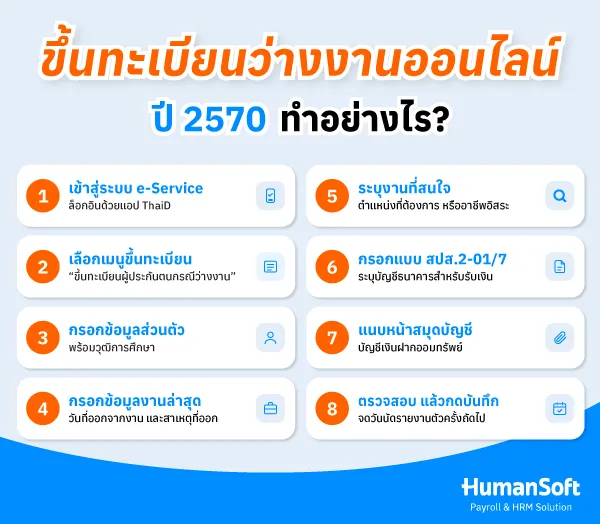
- Log in to e-Service with ThaiD using the steps above.
- Select the menu "Register an Insured Person for Unemployment".
- Enter your personal information and educational background.
- Enter your latest employment details, the date you left, and the reason for leaving.
- Specify the position you are looking for or your interest in self-employment.
- Complete form SSO 2-01/7 and provide the bank account for receiving payments.
- Attach a copy of the first page of your savings account passbook.
- Check your information, click save, and note the date of your next report.
What Information and Documents Do You Need to Register?
Before you start, prepare the following information and documents.
- Personal information: such as your full name and national ID number.
- Educational background: used for job matching and monthly reporting.
- Reason for leaving: such as resignation, layoff, or the end of a fixed-term contract.
- Copy of your bank passbook: a savings account showing your name and account number, for receiving benefits from Social Security.
- Unemployment benefit claim form (SSO 2-01/7)
Questions about employee rights and documents often start as messages sent to HR on LINE. When employees have a self-service channel to find answers, HR spends less time on repeat questions. Read more in LINE OA for Complete HR Self-Service
How Much Will You Receive, and When Will You Get Paid?
Unemployment benefits are calculated from the wages used to calculate your Social Security contributions, which have been capped at THB 17,500 per month since 1 January 2026. The rate depends on why you left your job.
| Reason for Unemployment | Benefit Rate | Benefit Period | Maximum per Month (THB 17,500 Cap) |
|---|---|---|---|
| Laid off | 60% of wages | Up to 180 days per calendar year | THB 10,500 |
| Resigned, or a fixed-term contract ended | 30% of wages | Up to 90 days per calendar year | THB 5,250 |
*The 60% rate for laid-off workers has applied since 28 June 2025 (previously 50%). Information as of November 2026.
For example, if you earn THB 12,000 per month and are laid off, you receive THB 7,200 per month (60% of 12,000). If you earn THB 17,500 or more, the benefit is calculated from the THB 17,500 cap, so the most you can receive is THB 10,500 per month.
As for when you get paid: if you register within 30 days after leaving your job, benefits are counted from the 8th day of unemployment. After you report as scheduled and the Social Security Office approves your claim, the money is transferred to the bank account you provided. Processing time varies case by case. You can check your status or report a problem through these channels.
- Social Security hotline 1506, press 1
- Your nearest Social Security Office branch
- The SSO Plus app
- The Social Security Office website
Summary: What Do You Need to Do to Register for Unemployment Online?
If you are a Section 33 insured person with at least 6 months of contributions within 15 months, log in to the Department of Employment e-Service with the ThaiD app and register within 30 days after leaving your job. Have form SSO 2-01/7 and your savings passbook ready beforehand. After that, report online as scheduled every month to receive every payment. Laid-off workers receive 60% of wages for up to 180 days, while those who resigned or whose fixed-term contract ended receive 30% for up to 90 days.
FAQ: Frequently Asked Questions About Unemployment Registration
Q: Where can I check whether my benefit has been approved?
A: You can ask about the approval result and payment status through the Social Security hotline 1506 (press 1) or your nearest Social Security Office branch, and you can view your benefit information in the SSO Plus app.
Q: Do I have to use ThaiD to register for unemployment online?
A: No. The Department of Employment e-Service login page offers 2 options: "Log in with ThaiD" and "Log in with Digital ID". You can use either one, and the page no longer has a username and password login.
Q: What happens if I miss a scheduled report?
A: You will not receive the benefit for that period, so report online on your scheduled date every month. If you have a problem, contact your local Employment Office or the 1506 hotline.
Related Articles
- Check Social Security by National ID via ThaiD
- How Long Do Social Security Benefits Continue After Resignation, and Should You Apply for Section 39?
- How Are Thailand Social Security Sections 33, 39, and 40 Different?
- SSO Plus: Register, Log In, and Check Social Security Benefits
- Online Social Security Contribution Submission for Employers
