
Free Leave Request Form in Word/PDF with Instructions
A leave request form is a document employees use to request approval for time off, such as sick leave, personal leave, or maternity leave. It must include the employee’s name, position, leave type, dates, and reason, followed by the supervisor’s signature of approval.
Download a free leave request form >> Leave Request Form (Word) Suitable for private companies and HR departments. Simply replace the letterhead with your company name and print it for immediate use.
Table of Contents:
- Free Leave Request Form in Word/PDF with Instructions
- What Is a Leave Request Form?
- Download a Free Leave Request Form in Word/PDF
- What Information Should a Leave Request Form Include?
- How Do You Complete a Leave Request Form Correctly?
- How Many Days of Each Type of Leave Are Employees Legally Entitled To?
- Why Are Leave Request Forms Important for Employees and HR?
- Paper Leave Forms vs. Online Leave Management: What Is the Difference?
- Summary: Leave Request Forms
- Frequently Asked Questions About Leave Request Forms
What Is a Leave Request Form?
A leave request form is a document employees submit to their supervisor or HR department to request time off on working days. It specifies the type of leave, the start and end dates, and the reason. Once signed and approved by the supervisor, it serves as a record for HR to track remaining leave balances and support payroll calculations. In English, it is called a Leave Request Form.
A leave request form is used for temporary absences, such as sick leave personal leave annual leave, or maternity leave. It is not a resignation document. If you need a resignation form, see Key Elements of a Resignation Letter That HR Should Know
Download a Free Leave Request Form in Word/PDF
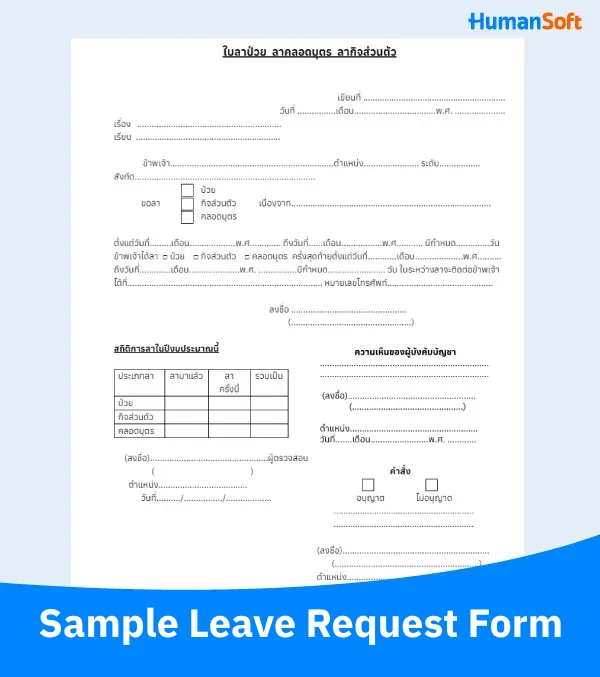
This template is a Word file that opens in Google Docs. To download it:
- Click the Leave Request Form
- Go to File > Download, then select Microsoft Word (.docx) or PDF.
- Open the Word file, update the letterhead with your company name and logo, and save it as a template for employees.
The form includes checkboxes for sick leave, personal leave, and maternity leave. To use it for annual leave as well, add an "Annual Leave" checkbox in the Word file. If you need an Excel file to record and summarize leave across the company, download the Employee Leave Tracking Spreadsheet
What Information Should a Leave Request Form Include?
A practical leave request form has eight sections. Employees complete the first six, while HR and the supervisor complete the final two.
| Form Section | Information to Enter | Completed By |
|---|---|---|
| Document Header | Place of writing, submission date, subject, and recipient (supervisor’s name or position) | Employee |
| Employee Details | Full name, position, level, and department | Employee |
| Leave Type and Reason | Select the leave type and write a brief reason after "Due to". | Employee |
| Leave Period | Start date, end date, and total number of days | Employee |
| Most Recent Leave | Type of leave last taken, with its start and end dates | Employee |
| Contact Details During Leave | Address or telephone number where the employee can be reached during leave, and the employee’s signature | Employee |
| Leave Record for the Current Year | Days previously taken, days requested, and total days, broken down by leave type | HR (Reviewer) |
| Comments and Decision | Supervisor’s comments, approval or rejection checkbox, and signature | Supervisor or Authorized Approver |
How Do You Complete a Leave Request Form Correctly?
Follow these five steps to help your supervisor process the request quickly and avoid follow-up questions from HR:
- Check your remaining leave balance first. Make sure you have enough leave available in the relevant category for the current year.
- Select the correct leave type. Give a brief, clear reason, such as "Flu; the doctor advised two days of rest."
- Enter all leave dates. Include the first day, last day, and total number of leave days, counting working days only.
- Attach supporting documents, if applicable. For example, an employer may request a medical certificate for sick leave of three working days or more.
- Add your contact details, sign, and submit the form to your supervisor. Follow your company’s procedures and keep a copy.
How Many Days of Each Type of Leave Are Employees Legally Entitled To?
Before entering the number of leave days, check the minimum entitlements under the Labour Protection Act. Companies may offer more than these minimums, but not less.
| Leave Type | Leave Entitlement | Paid Leave |
|---|---|---|
| Sick Leave | As long as the employee is actually ill | Up to 30 working days per year |
| Necessary Personal Business Leave | At least 3 working days per year | Paid |
| Annual Leave | At least 6 working days per year after completing 1 year of service | Paid |
| Maternity Leave | Up to 120 days, including prenatal appointments and holidays | Employer pays for up to 60 days |
| Sterilization Leave | As prescribed and certified by a doctor | Paid |
| Military Service Leave | As required for military call-ups, training, or readiness testing | Up to 60 days per year |
For detailed conditions for each leave type, see Employee Leave Entitlements Under Thai Labour Law in 2026 and Latest Labour Law: 120 Days of Maternity Leave
References: Labour Protection Act B.E. 2541 (1998) and its amendments, Ministry of Labour
Why Are Leave Request Forms Important for Employees and HR?
A leave request form provides a shared record that employees and HR can use to verify leave.
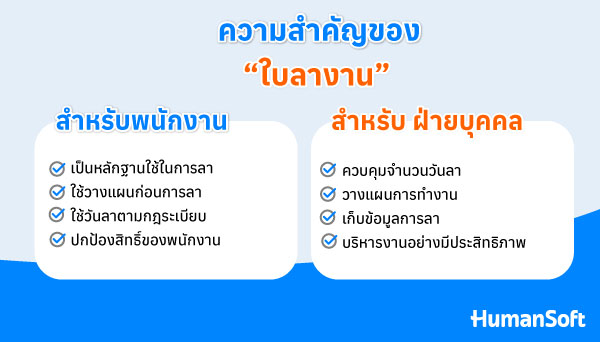
For Employees
- Proof of approved leave: Confirms that the absence was authorized and should not be recorded as an unauthorized absence.
- Plan ahead: Check remaining leave and hand over work in advance to avoid disruption.
- Follow leave procedures: Ensure leave complies with company rules and has a verifiable record.
- Protect employee rights: An approved form helps confirm that leave was taken within the employee’s entitlement, reducing later disputes over absences or wage deductions.
For HR
- Manage leave days: Ensure each employee’s leave follows company policy.
- Plan staffing: Know in advance who will be away and arrange cover in time.
- Maintain leave records: Analyze leave statistics and support workforce planning.
- Calculate payroll accurately: Check which leave days are paid and which require deductions.
Paper Leave Forms vs. Online Leave Management: What Is the Difference?
Paper or Word leave forms suit companies with a small workforce. As headcount grows, HR spends more time counting leave days and re-entering data. Online leave management helps reduce this workload.
| Topic | Paper / Word Form | Online Leave Management |
|---|---|---|
| Submitting a Request | Complete and print the form, then submit it to a supervisor. | Submit via mobile phone or computer. |
| Approval | The supervisor signs the document. | The supervisor approves the request in the system. |
| Remaining Leave Balance | HR calculates it manually from leave forms. | The system tracks it against configured quotas. |
| Document Storage | Filed on paper; past records are difficult to find. | Leave history can be retrieved immediately. |
Explore the features a leave management system should offer in Essential Features of a Free Online Leave Management System HumanSoft users can follow the guides for Configuring Leave Types and Configuring Leave Quotas
Summary: Leave Request Forms
A leave request form records a request for time off and must include employee details, leave type, dates, reason, and the supervisor’s approval signature. Companies can download the template above, update the letterhead, and use it immediately. Employees should follow the five steps, while HR checks leave days against legal entitlements. When the workforce grows and manual tracking becomes difficult, consider switching to online leave management.
Frequently Asked Questions About Leave Request Forms
Q: Can Employees Request Leave via LINE or Email Instead of a Form?
A: Yes, if the company accepts that channel for leave requests and keeps the supervisor’s approval message as evidence.
Q: Can a Leave Request Form Be Signed Electronically?
A: Yes. The Electronic Transactions Act recognizes electronic signatures if the signer can be identified and the signature is reliable.
Q: Can Employees on Probation Take Sick or Personal Leave?
A: Yes, from their first day of work. Sick and personal leave entitlements do not depend on passing probation.
Q: Can Employees Take Half-Day or Hourly Leave?
A: Yes, if company leave policies allow it. Clearly specify the hours on the form, such as morning leave from 08:00–12:00.
Q: Can a Supervisor Reject a Leave Request?
A: Sick leave for genuine illness is a statutory right. For personal and annual leave, companies may set approval criteria, but employees must be allowed to use at least their statutory entitlement.
Read More Related Articles


